Profile Setup & Identity
Users set a photo, username and name on a clear profile screen, with a character counter and green check.
 DapkeSocial video app with live streaming and PK battles.
 Lika Real EstateProperty discovery platform for listings and leads.
 BurpoutSocial fitness challenges that keep people moving.
 ChatLivoConnected customer communication SaaS workspace.
 EmoTalesAI storytelling adventures designed for children.
 EarnifyTrack Income from Multiple Sources with Analytics & Tax Planning.
Natpuu is an AI avatar chat app developed by Primocys for iCare Robotics India Pvt Ltd. It brings AI text and voice conversations, messaging, personal and business modes, and the Startup Shelf technology marketplace together in one iOS and Android mobile app.


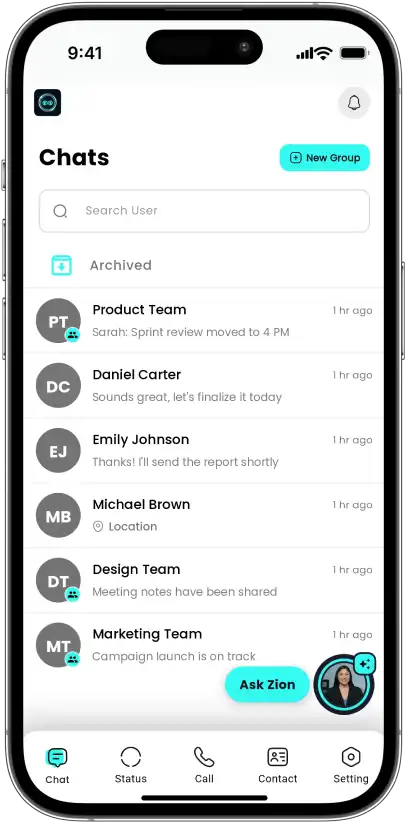
Natpuu is an AI app developed by Primocys for iCare Robotics, with AI avatar text and voice chat, messaging, business modes and a startup marketplace.
Users can chat with customized AI avatars in text, so AI conversations live inside the app instead of a separate tool.
Voice conversations with AI avatars give users another way to interact when typing is not the preferred option.
Messaging, personal and business modes and the Startup Shelf marketplace sit together in one connected product.
Natpuu needed AI avatar text and voice chat, messaging, business modes and a startup marketplace to work together as one simple, connected mobile app.
The Natpuu scope connects AI avatar chat and voice with messaging, personal and business modes, and a marketplace, so each feature feels part of one product.
Users can chat with customized AI avatars in text, bringing AI conversations into the same app as everyday messaging.
Voice-call style conversations with AI avatars give users a spoken alternative when typing is not the preferred option.
Messaging features let users connect with other people inside the same app as the AI experience.
Separate modes for personal and business conversations help users reach the right communication tools in each context.
A marketplace-style experience for deep-tech and robotics products lets users discover them inside Natpuu.
Offline messaging uses LoRa and depends on compatible hardware and operating conditions, so it is not a replacement for normal messaging.
AI features only work when everyday screens stay simple. Profiles, usernames and status updates need to feel clear and familiar on mobile.
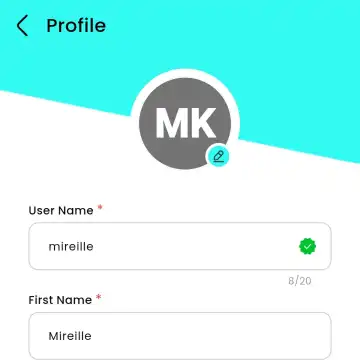
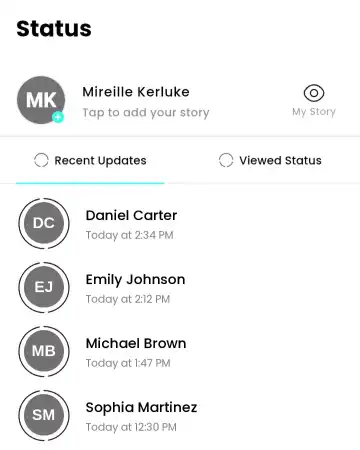
Users set a photo, username and name on a clear profile screen, with a character counter and green check.
Users can tap to add a story, open My Story and see recent updates from contacts with clear timestamps.
Separate Recent Updates and Viewed Status tabs help users catch up on new stories and revisit seen ones.
Natpuu brings AI avatar conversations, messaging, personal and business modes, the Startup Shelf marketplace and account sign-in together on iOS and Android.
Customized AI avatars respond in chat, so users can start an AI conversation without leaving the messaging app.
Users can speak with AI avatars through voice interactions, a natural option when typing is not the preferred choice.
Messaging features let users connect with other people in the same mobile app that hosts the AI conversations.
Dedicated modes for personal and business conversations help users reach the right tools for each context.
Startup Shelf adds marketplace-style discovery for deep-tech and robotics products inside the Natpuu ecosystem.
Account verification and sign-in are part of the product experience, giving users a clear way into the app.
Natpuu keeps everyday chat simple while adding AI mentors, text and voice conversations, contacts, status updates and settings in one mobile app.
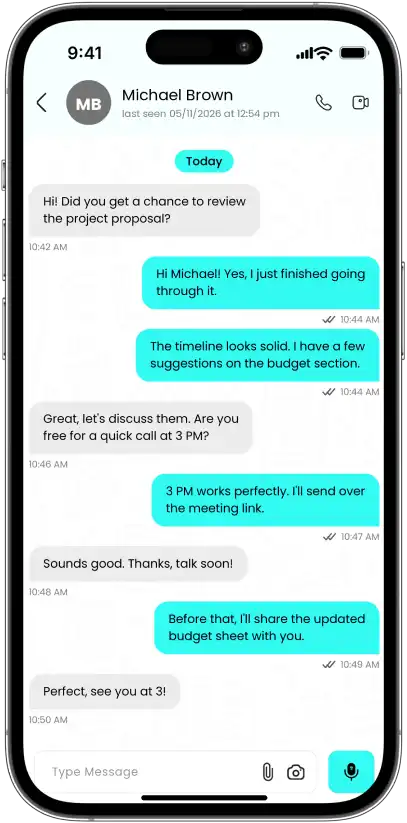
A familiar chat screen shows message times, read ticks and last seen, with attachment, camera and mic options plus call and video icons.
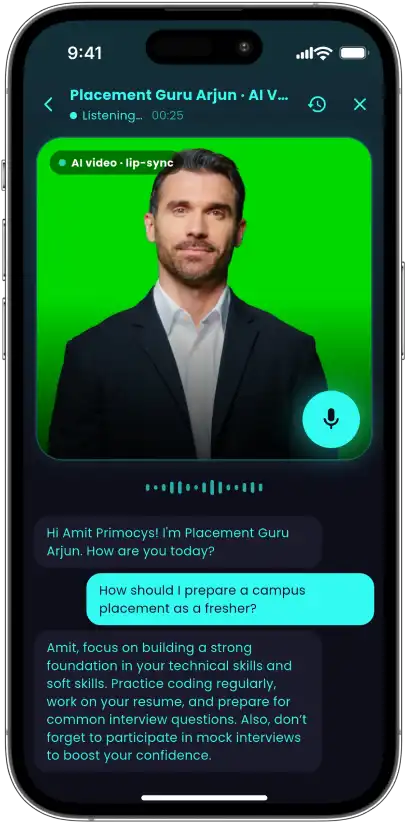
Users speak with an AI avatar on a live video-style screen showing listening status, a mic button, lip-sync and a text transcript of the reply.
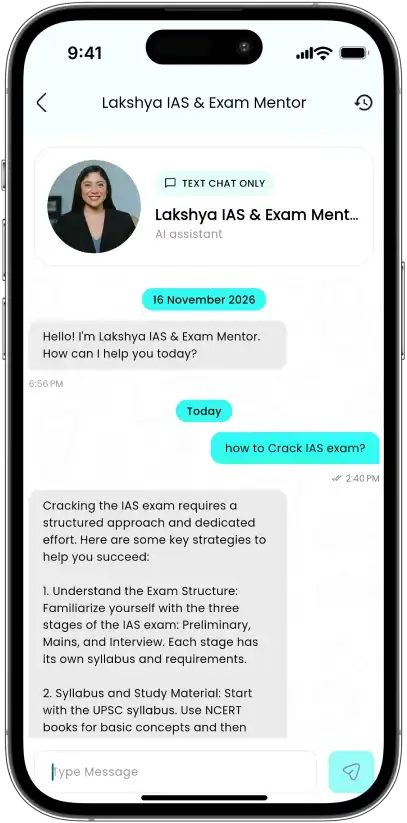
Text chat with an AI mentor shows a clear assistant profile, a Text Chat Only label, chat history access and a simple message box for questions.
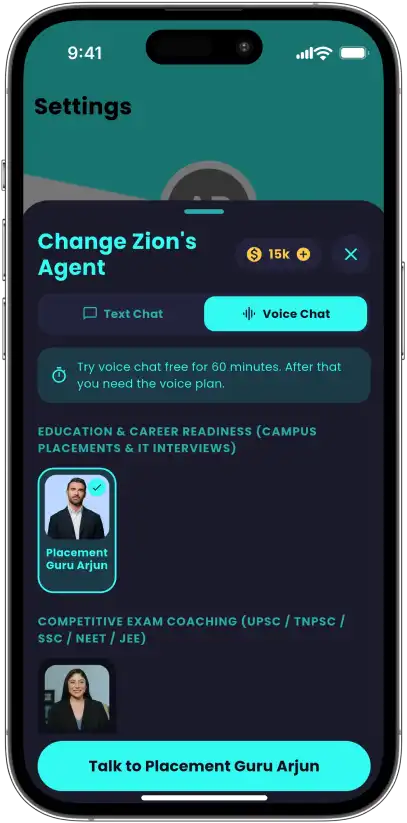
Users can switch an AI agent between Text Chat and Voice Chat, browse agents by category and see the free voice trial before choosing who to talk to.
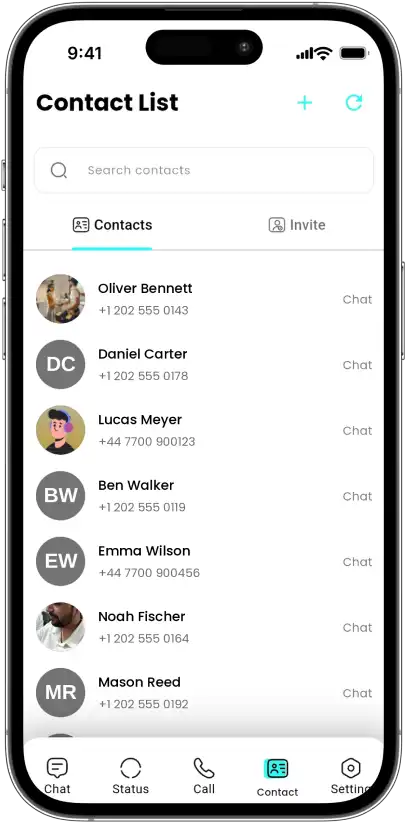
A searchable contact list with Contacts and Invite tabs lets users start a chat in one tap, with Chat, Status, Call, Contact and Settings tabs below.
Natpuu runs on Flutter, NestJS, PostgreSQL, WebRTC and AI voice avatars, with a React admin panel and Docker-based deployment.
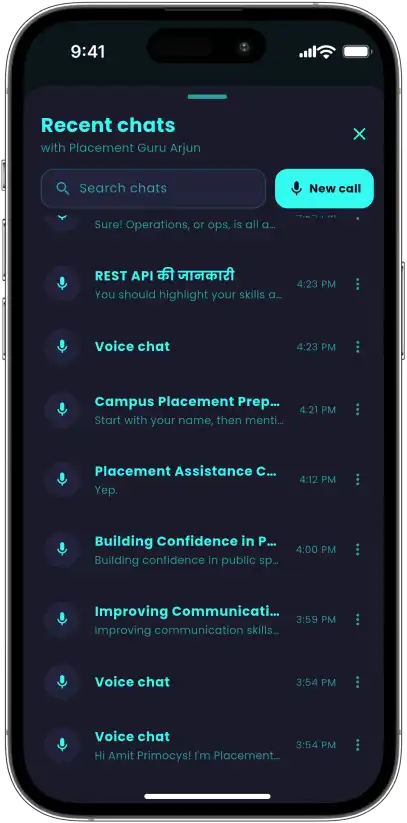
Explore Natpuu screens for AI voice chat history, coins, blue tick requests, contact details, settings and profile, and status stories.
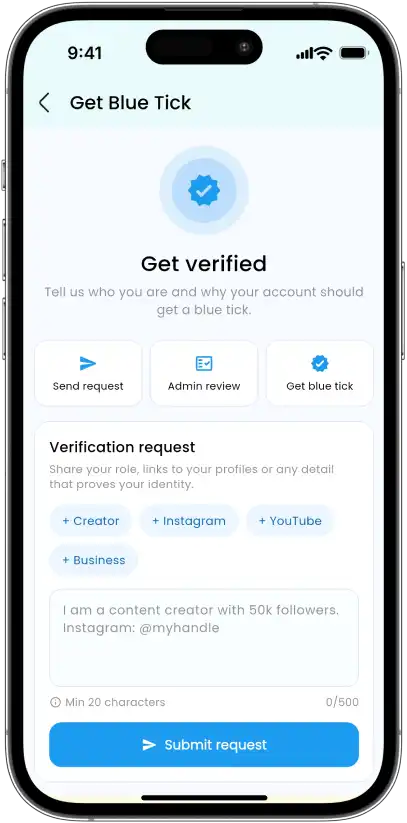
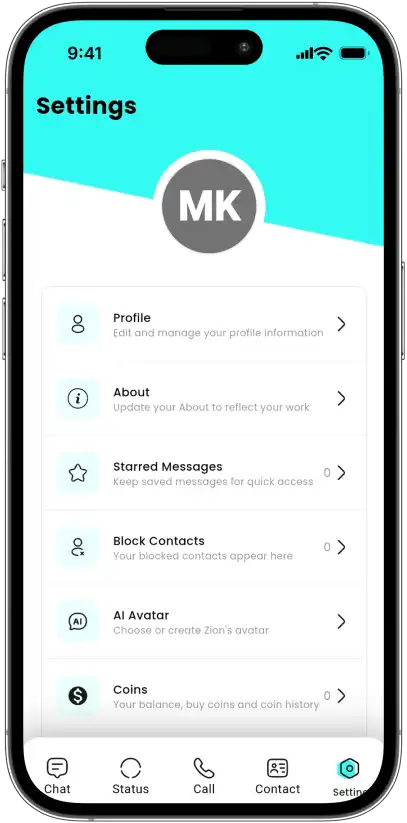
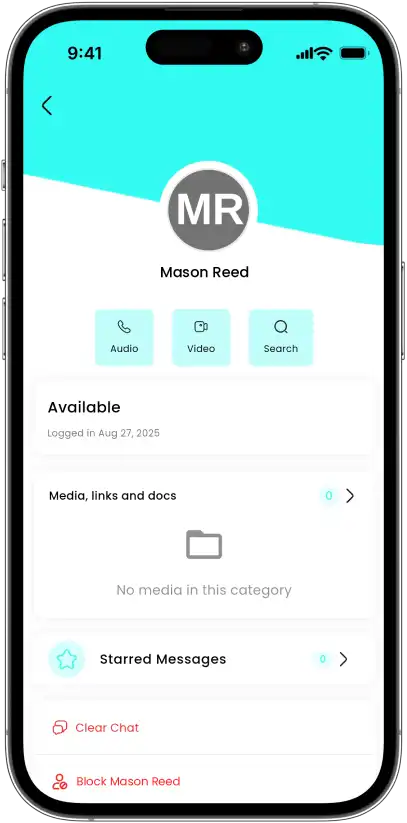
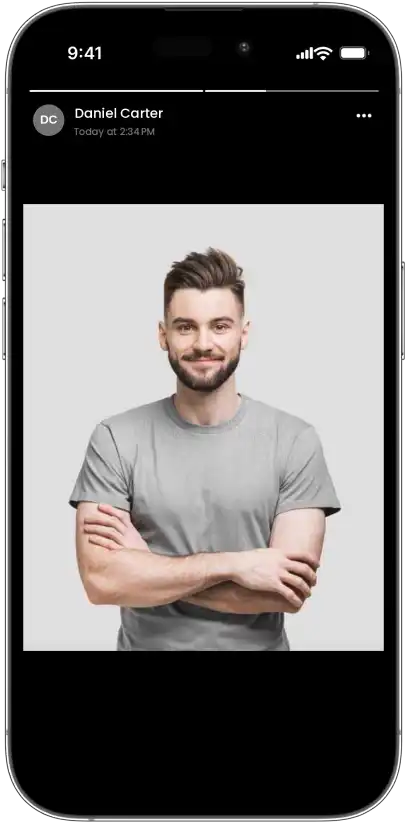
The cost of an AI avatar app depends on AI chat and voice features, messaging, verification, coin purchases, backend integrations and iOS and Android builds.
AI text chat, voice conversations and avatar video screens affect design effort, usage costs and the scope of the AI integration.
Contacts, chats, profiles, settings and status stories add screens and logic that grow the mobile app and backend scope.
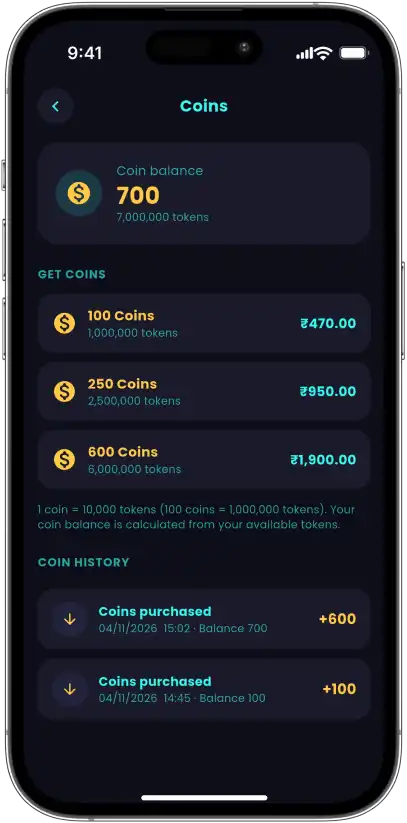
Coin purchases, blue tick requests with admin review and backend integrations shape the overall project timeline and cost.
Natpuu guides users from chats and contacts to AI avatar conversations, with voice options, coins and verification available from the same app.
Build Your AI App
Open the contact list, search for people and start a private chat, with call and video options inside each conversation.
Tap to add your own story, then view recent updates from contacts in a simple full-screen story viewer.
Open Settings to choose or change an AI avatar, then browse agents by category before picking who to talk to.
Switch between Text Chat and Voice Chat, with the free voice trial and voice plan shown before a voice conversation.
Check the coin balance, buy coin packs and review coin history from a dedicated Coins screen inside the app.
Send a verification request with your role or profile links, then wait for admin review to receive a blue tick.
Natpuu organizes chat, status, calls, contacts and settings into five tabs, with AI avatars, coins and profile controls reachable from the same app.
Chat, Call and Contact tabs keep private conversations, calling and the contact list within one tap of each other.
The Status tab brings stories and recent updates into the same app as chat, with a full-screen story viewer.
Settings brings together profile, starred messages, blocked contacts, the AI avatar choice and coins in one place.
Primocys built Natpuu to combine AI avatar chat, voice calls, messaging and a startup marketplace in one mobile app, live on iOS and Android.
Customized AI avatars let users hold text conversations inside the same app they already use to message.
Voice-call interactions give users a natural way to talk with AI avatars when typing is not the preferred option.
Separate modes keep personal and business conversations organized, so messaging fits different contexts in one product.
A built-in marketplace for deep-tech and robotics products adds product discovery to the Natpuu ecosystem.
Natpuu FAQs cover AI avatar chat, voice conversations, messaging, platform availability and how to plan a similar AI app.
Contact Us
Hear from our clients and why 1200+ businesses trust Primocys

"Our B2B and B2C platform helps Nigerian manufacturers sell at wholesale prices and suppliers offer competitive retail pricing, with a strong focus on Made in Africa products and easy local and international distribution. The app has received excellent user reviews for its design and unique features. Communication with the Primocys team was smooth in an agile setup, even beyond office hours when needed. Their mobile app development expertise is excellent—highly professional and reliable."

"The dating app was delivered successfully and approved by both Apple App Store and Google Play. Our users are highly impressed with the design, UI, and overall functionality. The project was well planned with clear milestones, and all modules were delivered on time. The team is talented, patient, and flexible, accommodating multiple scope revisions as requirements evolved. Their 24/7 development and support availability made the entire process smooth and reliable."

" We hired Primocys to develop a highly complex and specialized mobile application, and they delivered outstanding results. The app includes advanced features such as timeline mixers, classifieds, payments, advertisements, GPS functionality, and more. Their technical skills, timely delivery, availability, and the personal attention Arpan Sagar brings to each project truly stand out. The team stays focused and committed from start to finish—an excellent experience overall."

" Great team with excellent communication and a strong commitment to on-time delivery. They developed a fully customized mobile app for both Android and iOS, perfectly matching our requirements. The entire process was smooth and professional, with clear updates at every stage. They are reliable, skilled, and very easy to work with. We’re continuing our partnership on more projects, and choosing them has been one of the best business decisions I’ve made."

AWARDS



TRUSTED BY GLOBAL BRANDS