
Keeping Conversations Real-Time
Visitor and agent interfaces need synchronized message state without depending on manual refreshes or repeated polling for every interaction.
 DapkeSocial video app with live streaming and PK battles.
 Lika Real EstateProperty discovery platform for listings and leads.
 BurpoutSocial fitness challenges that keep people moving.
 ChatLivoConnected customer communication SaaS workspace.
 EmoTalesAI storytelling adventures designed for children.
 EarnifyTrack Income from Multiple Sources with Analytics & Tax Planning.
ChatLivo is a SaaS product built and operated by Primocys for businesses that want to manage customer conversations from one workspace. The live chat SaaS platform combines website chat with supported WhatsApp and email communication, while giving teams the workflows, visitor context, and administrative controls needed to manage customer conversations and operate the product day to day.
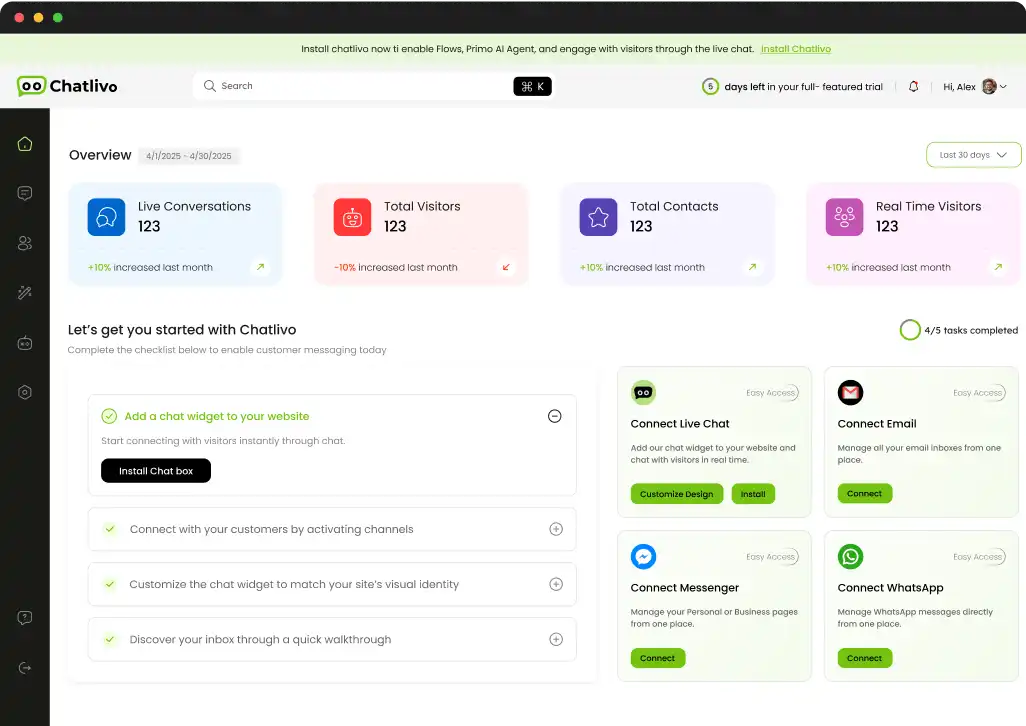
Customer conversations rarely stay in one channel. A visitor may start on your website, continue on WhatsApp, or prefer email. ChatLivo was built to bring these conversations into one workspace, helping businesses manage customer communication without juggling disconnected tools.
An embeddable widget lets visitors start conversations directly from a business website.
Supported WhatsApp and email communication can be brought into the same broader customer-support workflow.
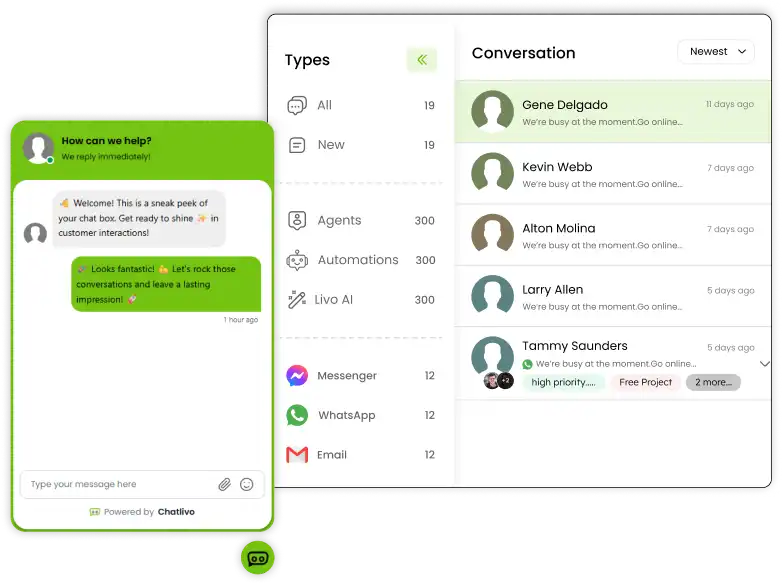
Agents work from a shared interface with practical tools for managing ongoing conversations.
Organizations, workspaces, domains, permissions and product-level controls support the multi-tenant SaaS model.
ChatLivo had to serve two audiences: visitors seeking a simple chat experience and support teams needing structure, ownership, and context. Its SaaS architecture also had to isolate each business workspace while running from one platform.
ChatLivo is not only a client-style implementation. Primocys built the product as its own SaaS platform, which means the work covers product planning, customer-facing interfaces, backend engineering, integrations, SaaS administration and the operational decisions required to maintain and improve a live software product.
Structuring the customer, agent, workspace and administration journeys required across the SaaS product.
Building the embeddable website interface used by visitors to start and continue conversations.
Developing the operational interface where support teams manage customer conversations and related context.
Supporting authentication, conversations, messages, visitors, workspaces, permissions and channel integrations.
Connecting visitor and agent interfaces so messages and conversation state can update without page refreshes.
Connecting supported WhatsApp business communication through Meta’s Cloud API.
Connecting supported Gmail-based email workflows to the broader customer communication experience.
Separating organizations, workspaces, domains and users within one shared SaaS platform.
Providing the management layer needed to operate accounts, plans and platform-level SaaS functions.
Live chat looks simple from the visitor side, but the system behind it has to manage persistent conversations, real-time events, multiple agents, external channels, permissions and tenant boundaries. The difficult part is keeping those responsibilities coordinated while preserving a simple experience for the people actually using the product.
Visitor and agent interfaces need synchronized message state without depending on manual refreshes or repeated polling for every interaction.
A SaaS product must scope conversations, agents, domains and settings to the correct organization and workspace at every relevant layer.
Website chat, WhatsApp and email do not produce identical events, so the product needs a consistent internal conversation model without ignoring channel-specific behavior.
The widget should stay lightweight for visitors while the team dashboard needs enough context and workflow tools to support real customer conversations.
ChatLivo’s SaaS architecture brings the customer widget, team workspace, real-time communication, conversation data, and third-party channels together in one connected platform. Each layer has a clear role, making the system easier to scale, manage, and evolve.
Embeddable website chat widget and web dashboard used by businesses and their support teams.
Authentication, organizations, workspaces, agents, visitors, conversations, tags, settings and product logic.
Message events, conversation updates, presence-related state and visitor-to-agent communication.
Website chat plus supported WhatsApp Cloud API and Gmail-based email integration.
Conversation data, account configuration, access controls, connected domains and platform-level operational tools.
The architecture supports the complete customer conversation and platform management lifecycle. Visitor-facing conversations connect with backend services for real-time messaging, tenant context, channel integrations, and the administrative controls that support day-to-day SaaS operations.
ChatLivo’s feature set is organized around customer communication rather than a collection of unrelated support tools. Each capability helps a visitor start a conversation, helps a team manage that conversation, or helps the business configure how the communication experience should operate.
Businesses can add a customer-facing chat entry point to supported websites and connected domains.
Agents can work from one interface instead of treating every customer message as an isolated interaction.
Supported WhatsApp business communication can be connected through Meta’s Cloud API.
Supported Gmail-based email communication can be connected to the broader customer conversation workflow.
Businesses can control how team members participate in the workspace and access relevant operational functions.
Teams can organize conversations and reuse common responses without manually recreating routine support content.
The platform can surface relevant visitor context so agents have more information than a message alone.
Businesses can define when the team is available and align the website communication experience with actual operating hours.
The multi-tenant model connects each business account with its own workspace, users and supported website domains.
ChatLivo’s AI Assistance is built around business-owned knowledge rather than a generic answer box. A team can add website content through web scraping and maintain FAQs as a structured data source. When a visitor asks a question, the AI uses the configured knowledge to prepare a relevant response inside the same customer conversation.
The business connects supported website pages through scraping so product, service and support information can be used by the AI assistant.
Teams can maintain direct question-and-answer knowledge for recurring topics that should not depend only on scraped pages.
A visitor asks about a product, service, policy or other topic covered by the business’s configured knowledge.
The AI assistant prepares its reply from the available business knowledge instead of treating the conversation as an isolated model prompt.
Some customers are not only asking for information—they are asking what to choose. ChatLivo can use the available conversation and product context to suggest relevant products during the chat, helping businesses combine support and product discovery without sending the visitor into a separate recommendation experience.
The recommendation starts from what the visitor is actually asking instead of showing the same products to every user.
Suggestions can use the product information made available through the business’s configured knowledge sources.
The product suggestion stays inside the assistance experience so the customer can continue the same conversation with AI or a human agent.
The product is designed around a simple operational flow: a visitor starts a conversation, the message enters the correct business workspace, an agent works with the available context, and the conversation remains part of the customer’s ongoing history rather than disappearing after one interaction.
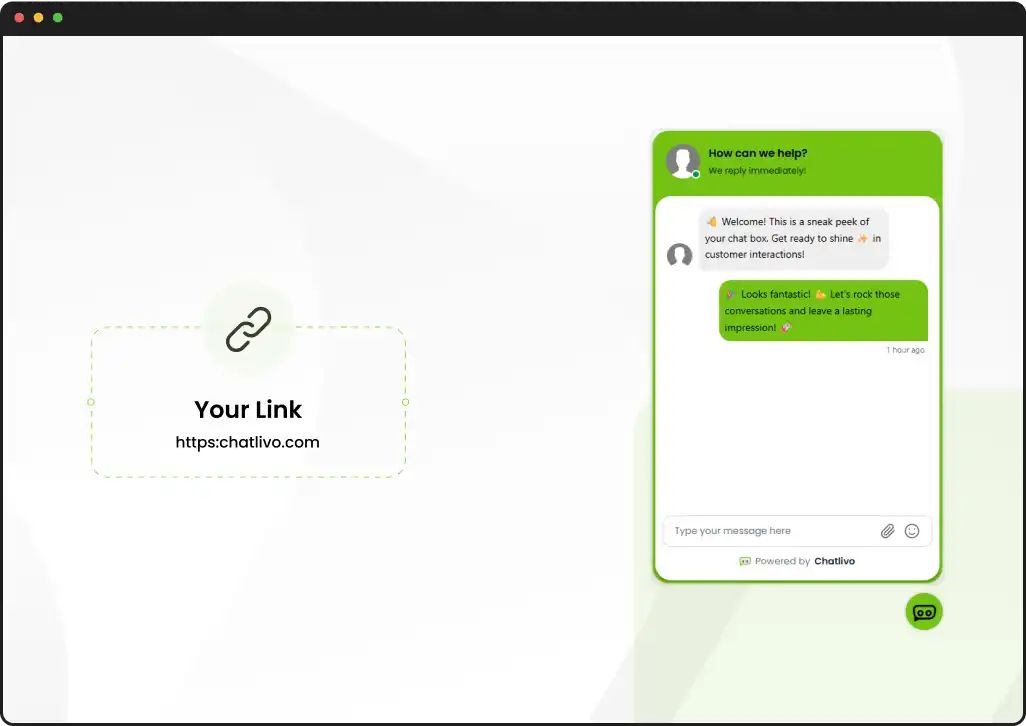
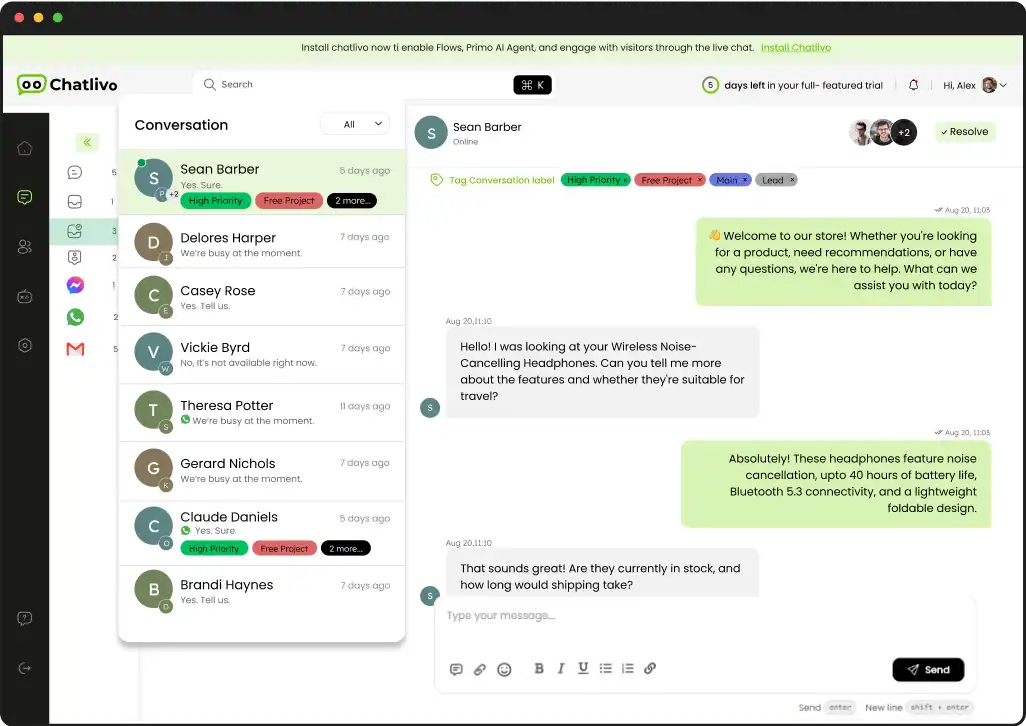
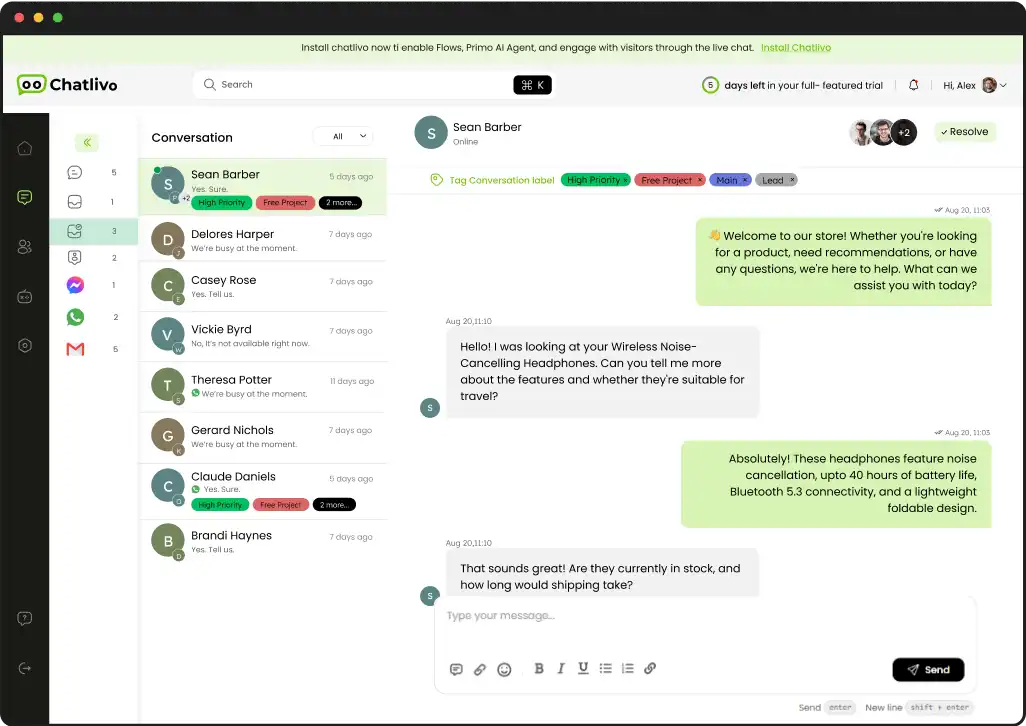
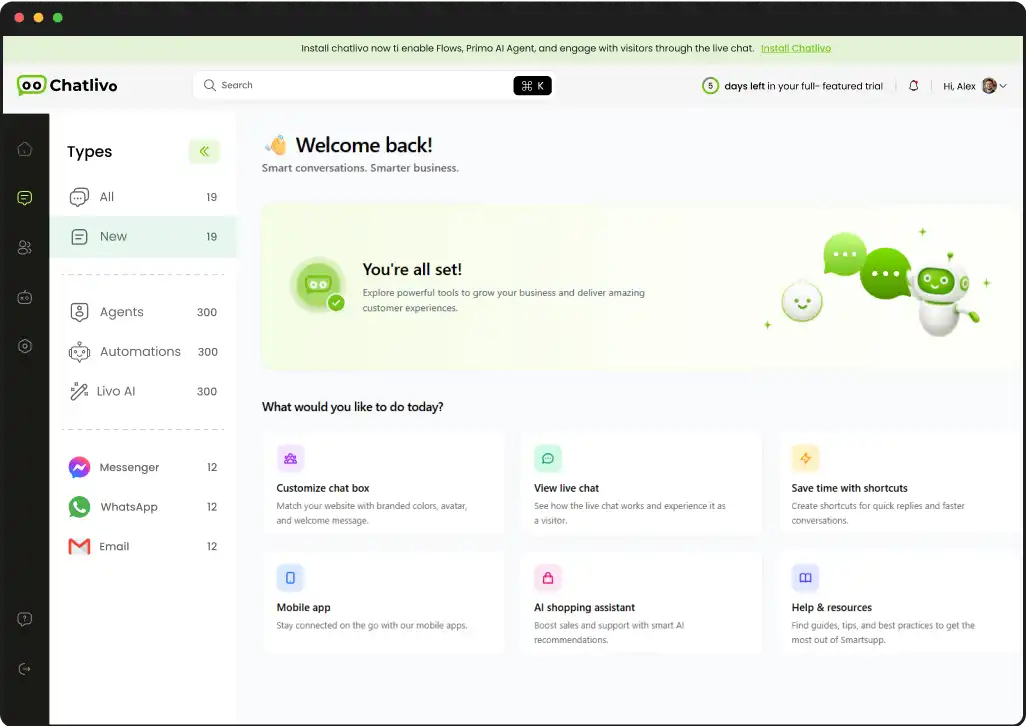
A customer uses the website widget or an available connected communication channel.
The conversation is associated with the relevant business, workspace and channel context.
A permitted team member handles the conversation using available visitor context and workspace tools.
The interaction remains part of the conversation record for later follow-up and operational continuity.
ChatLivo runs on a modern web application layer with real-time communication, backend APIs, secure authentication, persistent data storage, and integrations with WhatsApp and Gmail — built to support real customer conversations at scale.
A strong case study shows the product, not just describes it. These real ChatLivo screenshots walk through the chat widget, conversation workspace, visitor context, settings, team management and connected channels.
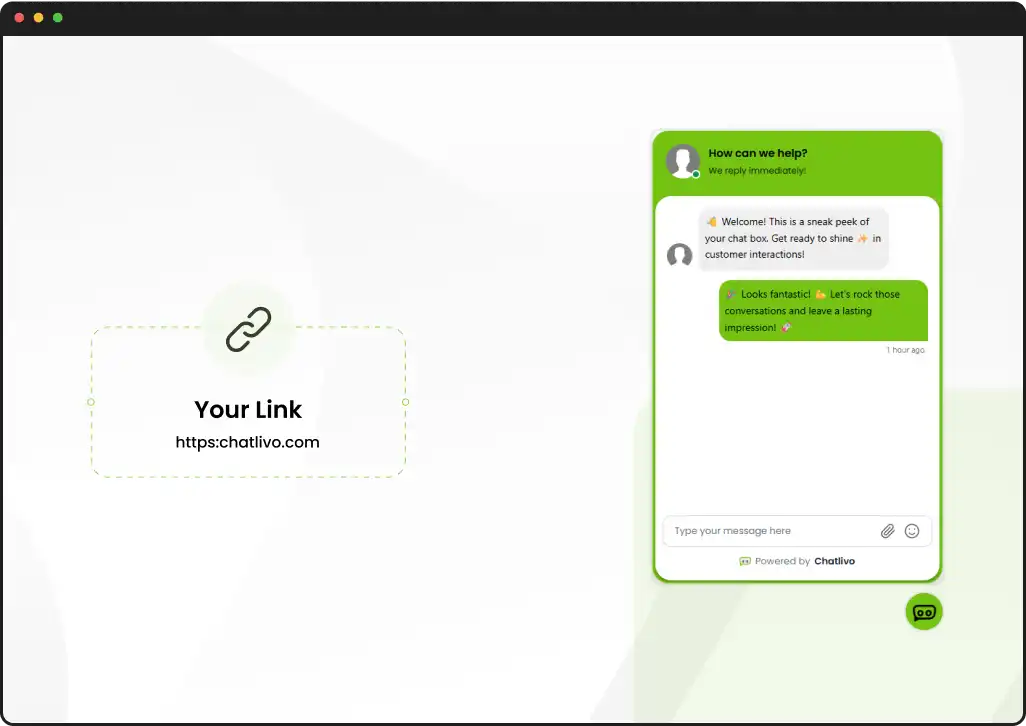
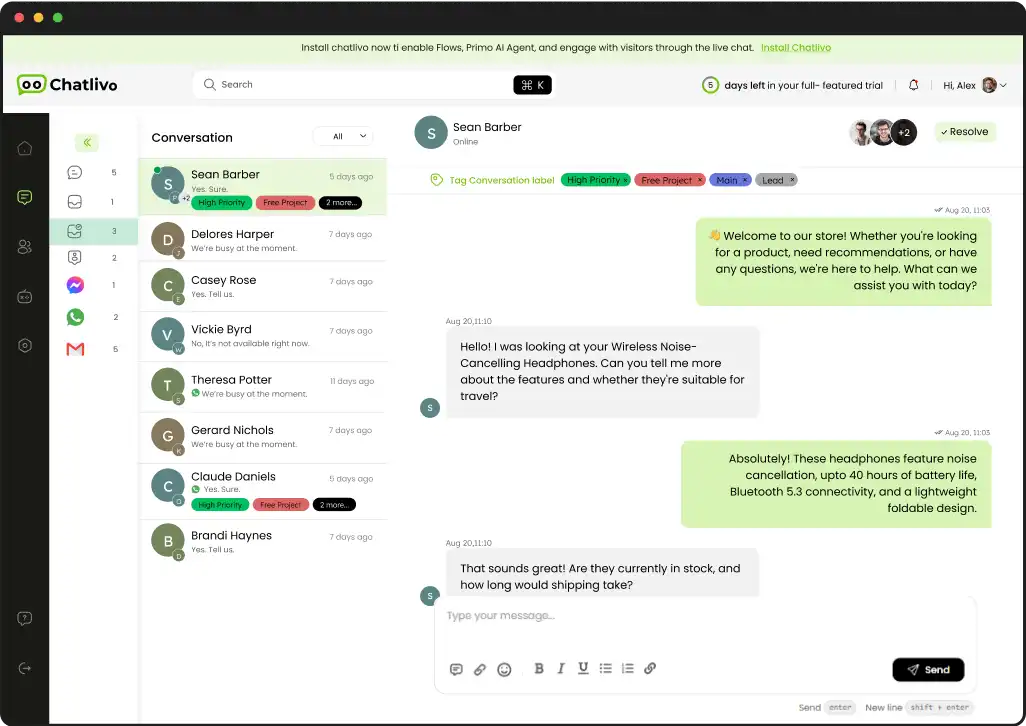
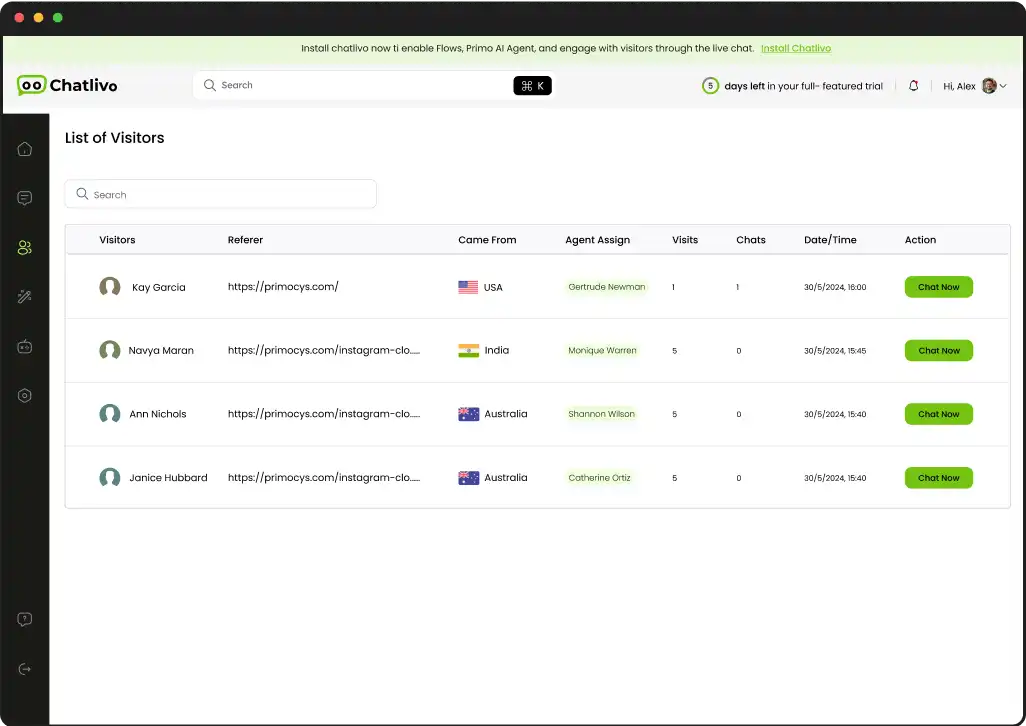
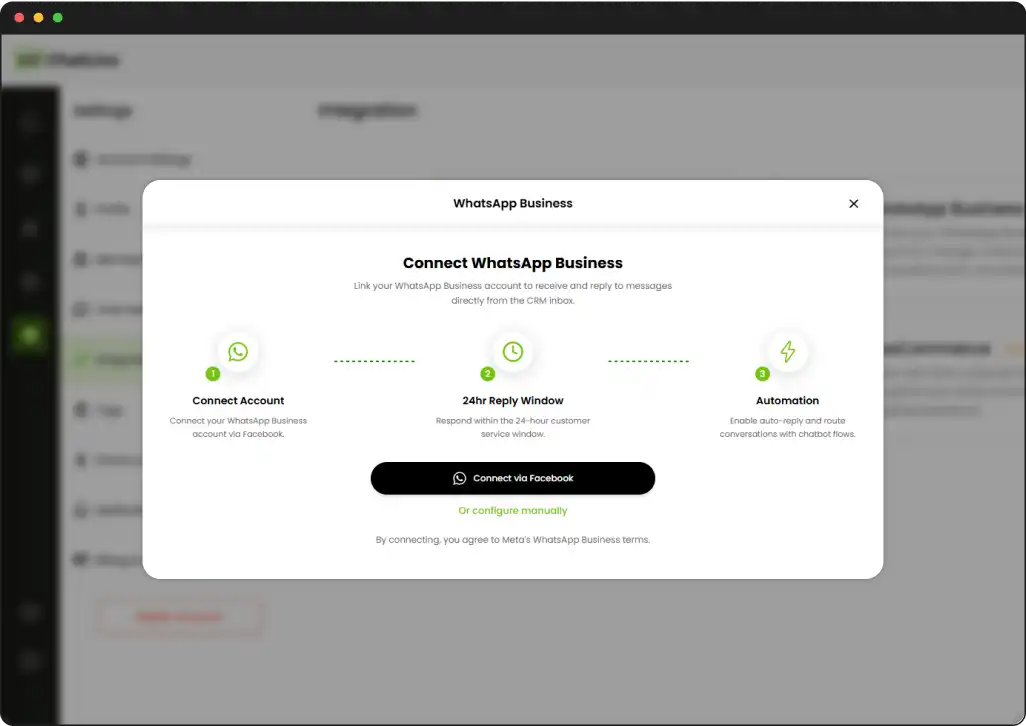
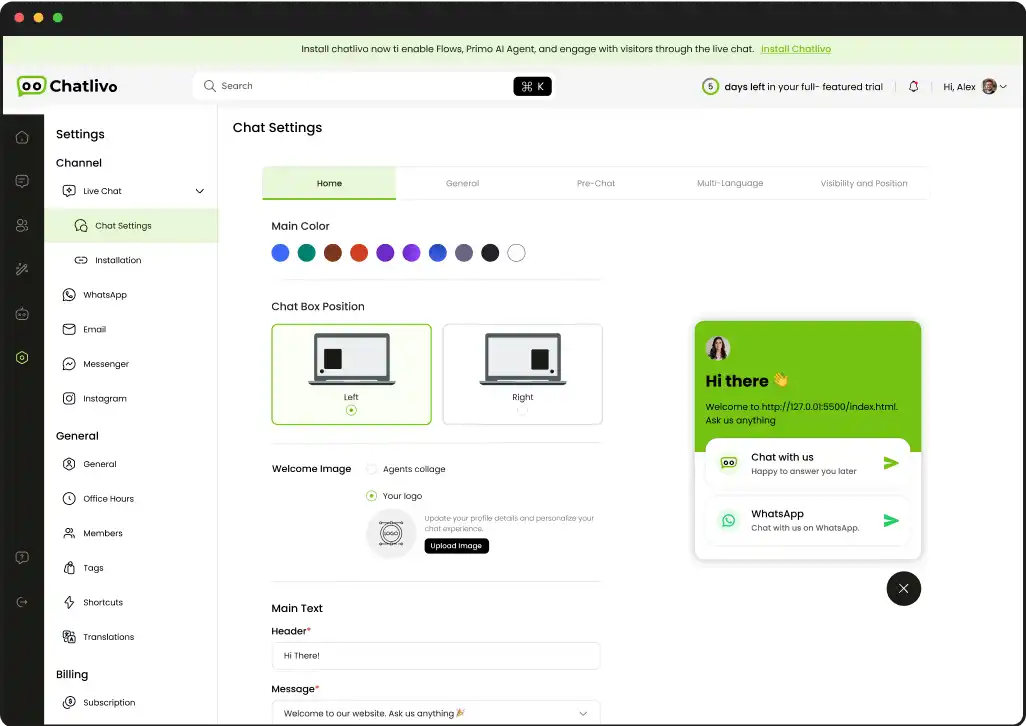
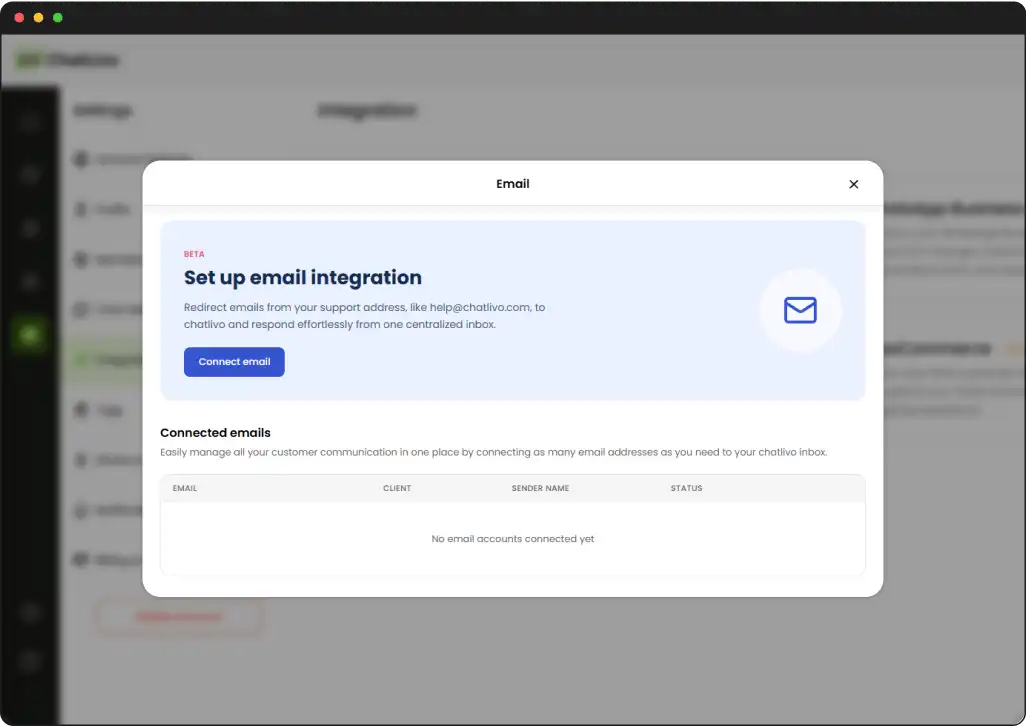
The real decisions behind a communication SaaS aren’t about screen count — they’re about how conversations, tenants, channels and real-time events are modeled, so new channels never become separate support systems.
Different customer channels need a consistent internal structure while preserving the channel-specific details required to send and receive messages correctly.
Organization and workspace context should remain part of authentication, permissions, conversations, settings and channel configuration.
Message delivery and live interface updates are operationally different from storing conversation history and durable account data.
The visitor interface should remain lightweight while the team dashboard can expose richer operational tools and context.
WhatsApp and email are connected to the same broader workspace rather than forcing businesses to use independent communication dashboards.
ChatLivo also needs a platform-level view above the individual business workspace. This operational layer allows the SaaS product itself to be managed, while customer-facing teams continue working inside their own organizations and workspaces.
Every business account gets its own home base here — workspaces, teams and settings stay organized instead of blending into one big, messy shared system.
Add teams, set clear permissions and control who touches what — so the right people always get access without ever stepping on each other’s toes or work.
Keep every connected website tied to the correct workspace, so incoming conversations always land exactly where your team expects them to land every time.
Handle plans, usage limits and billing logic from one single place — the quiet backbone that keeps a subscription SaaS business actually running smoothly.
Turn on WhatsApp, email or live chat per workspace, then configure each connection the exact way that specific business actually needs it to run smoothly.
Run the whole platform, not just the product itself — the controls that let a real SaaS operate reliably and confidently beyond any single customer account.
ChatLivo was developed into a working customer communication SaaS that connects website live chat with team workflows and supported external channels. The platform gives Primocys a live environment for continuing to improve a multi-tenant SaaS product rather than treating the product as a one-time prototype.
ChatLivo operates as a real product rather than a design concept or portfolio mockup.
The platform brings website conversations and supported external channels into one operational product.
Organizations, workspaces, domains and agents are structured for a SaaS business model.
Primocys continues to work with the product after launch, gaining direct experience from SaaS operations and product development.
The cost of a live chat or customer support SaaS depends on more than the inbox interface. Real-time communication, tenant separation, communication channels, permissions, billing, admin workflows, integrations and the expected operating model all affect the engineering scope.
A website-only live chat product is a different project from a platform combining chat, WhatsApp, email and additional channels.
Organizations, workspaces, departments, roles and permissions add important SaaS architecture and access-control requirements.
External communication providers, CRM systems, email platforms and other tools introduce authentication, webhook and data-mapping work.
Subscription billing, plan limits, admin controls, analytics and account lifecycle workflows increase the platform-side scope.
Covers what ChatLivo is, what Primocys built, how the SaaS is structured, and what to consider when planning a similar live chat platform.
Contact Us
Hear from our clients and why 1200+ businesses trust Primocys

"Our B2B and B2C platform helps Nigerian manufacturers sell at wholesale prices and suppliers offer competitive retail pricing, with a strong focus on Made in Africa products and easy local and international distribution. The app has received excellent user reviews for its design and unique features. Communication with the Primocys team was smooth in an agile setup, even beyond office hours when needed. Their mobile app development expertise is excellent—highly professional and reliable."

"The dating app was delivered successfully and approved by both Apple App Store and Google Play. Our users are highly impressed with the design, UI, and overall functionality. The project was well planned with clear milestones, and all modules were delivered on time. The team is talented, patient, and flexible, accommodating multiple scope revisions as requirements evolved. Their 24/7 development and support availability made the entire process smooth and reliable."

" We hired Primocys to develop a highly complex and specialized mobile application, and they delivered outstanding results. The app includes advanced features such as timeline mixers, classifieds, payments, advertisements, GPS functionality, and more. Their technical skills, timely delivery, availability, and the personal attention Arpan Sagar brings to each project truly stand out. The team stays focused and committed from start to finish—an excellent experience overall."

" Great team with excellent communication and a strong commitment to on-time delivery. They developed a fully customized mobile app for both Android and iOS, perfectly matching our requirements. The entire process was smooth and professional, with clear updates at every stage. They are reliable, skilled, and very easy to work with. We’re continuing our partnership on more projects, and choosing them has been one of the best business decisions I’ve made."

AWARDS




TRUSTED BY GLOBAL BRANDS