Powered by Chatlivo EMR Telemedicine Platform Development Case Study | Primocys
Primocys Logo

Connected EMR &
Telemedicine Platform Development

This connected healthcare platform brings scheduling, clinical records, prescriptions, labs, referrals, billing, telemedicine and secure communication into one workflow. Built around Patient → Clinical Record → Workflow → Communication, it connects care teams, patients and operations through a shared clinical context.

FHIR-Oriented EMR
WENO eRx
mediasoup Telemedicine
Labs & Referrals
Secure Messaging
Node.js + TypeScript
EMR telemedicine platform development

Where Clinical Care Meets Operational Control

This EMR and telemedicine platform connects clinical records, scheduling, e-prescribing, video visits, labs, referrals, billing and secure messaging around a connected patient care workflow.

Clinical Records

FHIR-oriented patient and provider data connects appointments, encounters, medications, observations, diagnostic reports and referrals within the clinical record.

Care Delivery

Appointment-linked video consultations, WENO eRx, lab workflows, referrals and imaging support connected care from scheduling through clinical follow-up.

Secure Communication

Secure messages connect to patients, encounters, appointments, referrals, prescriptions, labs and imaging, creating searchable communication with detailed message auditing.

Access & Administration

Role-based permissions, audit and access logs, session controls and administrative workspaces keep each user role within the appropriate level of platform access.

Planning an EMR or telemedicine platform around real care workflows? Speak with our team about your requirements.

+91 98246 14016

The Product Requirements Behind This EMR Platform

The platform needed to connect clinical records, scheduling, prescriptions, telemedicine and messaging while giving each role controlled access to the appropriate patient and workflow context.

BUSINESS REQUIREMENTS

Business Requirements

  • Keep patient, provider and clinical records connected across the care workflow instead of isolated in separate tools.
  • Support care workflows from scheduling and telemedicine through prescriptions, diagnostics, referrals and follow-up.
  • Give patients one portal for appointments, medical information, prescriptions, payments, documents and communication.
  • Support provider onboarding with NPI/DEA details, licenses, locations and telemedicine jurisdictions.
  • Give administrators controlled access, audit visibility, role management and billing oversight across the platform.
PRODUCT REQUIREMENTS

Product Requirements

  • A FHIR-oriented data model connecting patients, practitioners, appointments, encounters, medications, results and communications.
  • Appointment-linked video consultations with waiting rooms, join flow, session identity verification and consultation records.
  • WENO eRx workflows plus a lab adapter layer with Quest, Labcorp and CPL readiness and HL7/FHIR-oriented mapping.
  • Secure messaging linked to patients, encounters, appointments, referrals, prescriptions, labs and imaging with message auditing.
  • An API-first Node.js, TypeScript and PostgreSQL backend supporting RBAC, webhooks, background jobs and modular services.

What Primocys Designed & Developed for This EMR

Primocys shaped the product architecture, clinical workflows, telemedicine experience and integrations into one connected healthcare platform serving patients, providers, staff and administrators.

Planning
Healthcare Product & Workflow Planning

Mapping patient, provider and staff journeys from booking to follow-up into one connected product flow.

EMR
EMR & FHIR-Oriented Data Model

Structuring clinical records so appointments, encounters, orders and results stay linked to the patient.

Telemedicine
Telemedicine & Care Delivery

Designing appointment-linked video visits with waiting room, join flow and consultation records.

Integrations
Integrations & Interoperability

Planning WENO eRx, lab adapters and HL7/FHIR-oriented mapping around the core clinical record.

Security
Secure Messaging & Access Control

Role-based permissions, audit trails and messaging linked to patients, encounters and results.

Backend
API-First Backend & Administration

Node.js, TypeScript and PostgreSQL services, REST APIs and admin tools behind every role’s workspace.

Challenges of a Modern Healthcare Management Platform

Building a hospital management dashboard meant balancing doctor profiles, patient records, appointments, and staff workflows without overwhelming busy clinical teams.

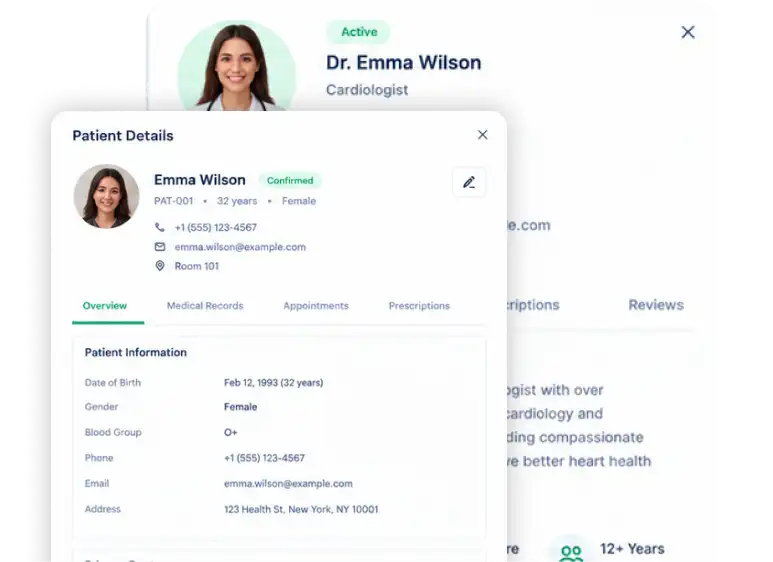
EMR patient and doctor profile screen

Presenting Doctor Profiles Without Overloading Staff

Each doctor profile carries experience, ratings, contact details, qualifications, and availability. We organized it into a side panel with clear tabs so staff can find what they need and book an appointment quickly.

Making Patient Records Clear at a Glance

Patient details, primary doctor, last visit, next appointment, and alert status all need to be visible without digging through screens. The patient panel groups them into a clean overview with separate tabs for deeper records.

Connecting Appointments, Records, and Staff in One Workflow

Doctors, patients, and appointments are closely linked in daily operations. Side panels keep the main list in context, and quick actions like View Profile and Book Appointment let teams move between them without losing their place.

How the EMR & Telemedicine Platform Is Structured

The platform connects clinical data, care workflows, telemedicine, secure messaging and role-based access through a modular architecture that keeps each domain connected to the patient and workflow context.

Clinical Data Layer

A FHIR-oriented data model connects patients, practitioners, appointments, encounters, medications, observations, diagnostic reports, referrals and communications within the clinical record.

Care Workflows & Video

Scheduling, encounters, appointment-linked telemedicine, e-prescribing, referrals and imaging connect clinical actions from booking through consultation and follow-up.

Backend, Messaging & Access

Node.js, TypeScript and PostgreSQL support REST APIs, RBAC, secure messaging, notifications, background jobs, audit logs and controlled access across role-specific workspaces.

One EMR & Telemedicine Platform, Fully Connected

The platform connects patient and provider records, scheduling, FHIR-oriented clinical data, e-prescribing, telemedicine, diagnostics, referrals, payments, patient self-service and secure messaging—keeping each workflow connected to the relevant clinical context.

Foundation
Patient & Provider Management

Manage patient registration, medical information, allergies, medications and insurance, alongside provider onboarding, NPI/DEA details, licenses, locations and telemedicine jurisdictions.

Scheduling
Scheduling & Encounters

Connect provider calendars, working hours, availability, booking and rescheduling with telemedicine appointments, patient charts, treatment notes, diagnoses, plans and follow-up instructions.

EMR
FHIR-Oriented EMR

Structure clinical records around FHIR-oriented resources such as Patient, Practitioner, Appointment, Encounter, Observation, Condition, MedicationRequest, DiagnosticReport, ServiceRequest and Communication.

e-Prescribing
Medication & WENO eRx

Support medication lists and reconciliation, WENO eRx, pharmacy search, preferred pharmacy selection, patient/provider mapping and prescription history and status synchronization.

Telemedicine
mediasoup Telemedicine

Enable appointment-linked doctor and patient video consultations with waiting rooms, join flow, camera and microphone controls, call status, session identity verification and consultation records.

Diagnostics
Labs & Integrations

Connect lab orders and results through DiagnosticReport and Observation, with abnormal-result indicators and an adapter layer with Quest, Labcorp and CPL readiness plus HL7/FHIR-oriented mapping.

Referrals
Referrals, Imaging & eFax

Support referrals by specialty and location, attached documents and eFax status/resend, alongside imaging orders for MRI, CT, X-ray, ultrasound and other diagnostic imaging.

Billing
Payments & Memberships

Manage patient and appointment payments, transaction history, refunds and receipts, plus memberships, configurable discounts, invoices, balances and billing history.

Marketplace
Provider Marketplace

Help patients discover providers by specialty, location and availability, with consultation pricing, telemedicine availability, search, filtering and appointment booking.

Patient Portal
Patient Portal

Give patients access to appointments, medical information, prescriptions, labs, referrals, payments, memberships, documents, questionnaires and provider communication from one portal.

Communication
Secure EMR Messaging

Connect internal message threads, search, attachments and priorities with patients and encounters while supporting role-to-role communication, notifications and detailed message auditing.

Security
RBAC & Security

Support admin, receptionist, practitioner, patient and staff roles with configurable permissions, audit and access logs, session controls, encryption, backup/recovery and retention policies.

UX Flow — How Users Experience KoolMD

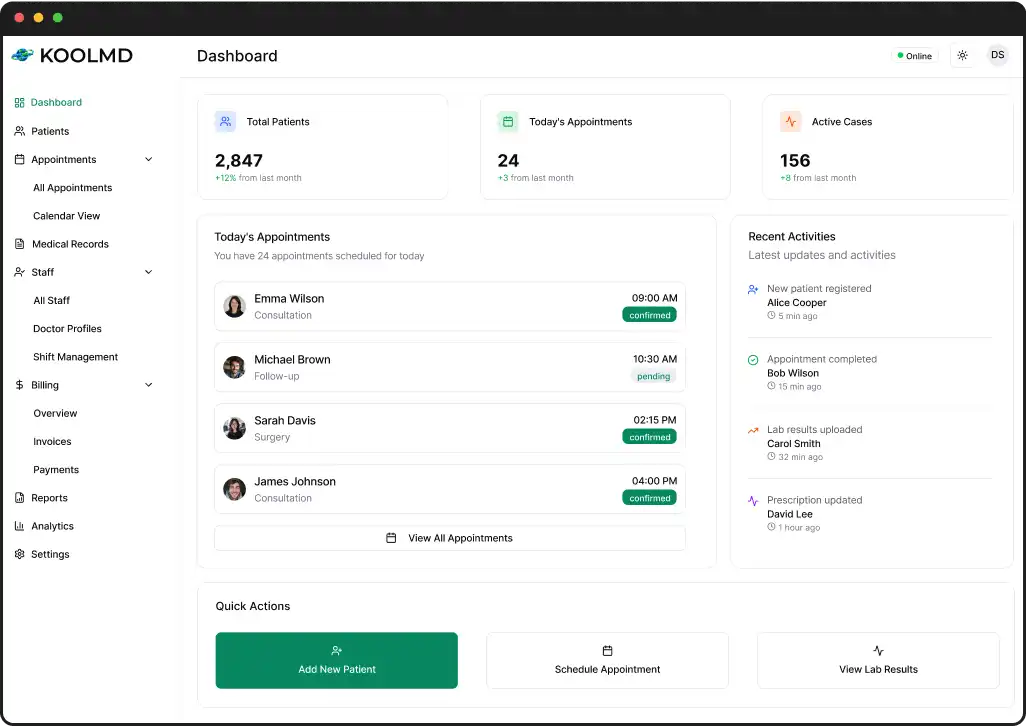
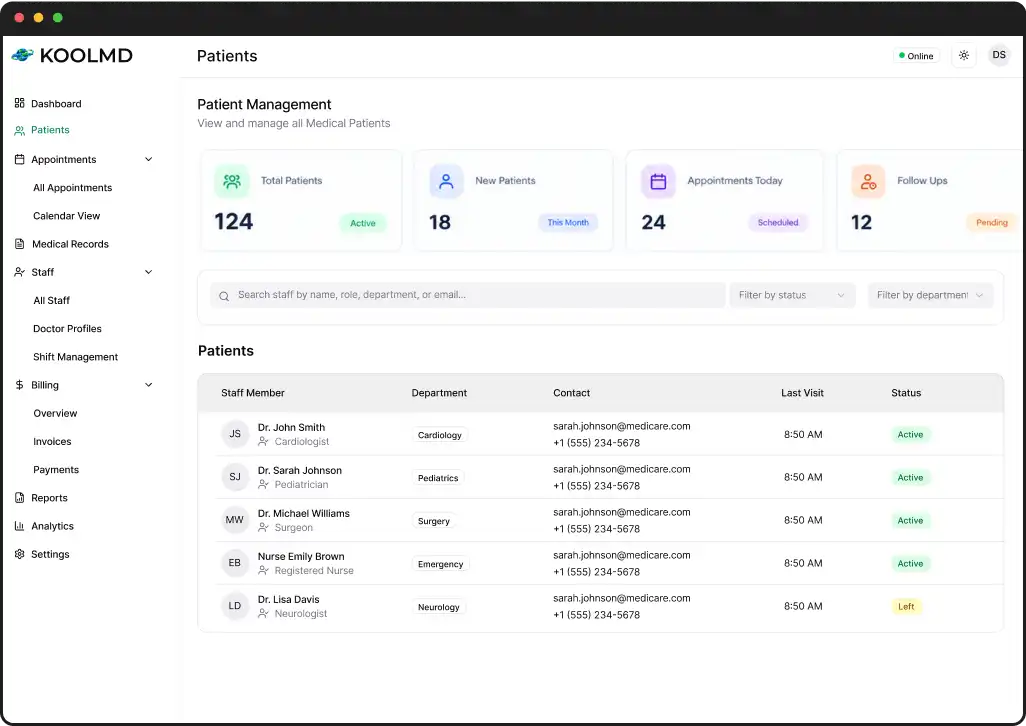
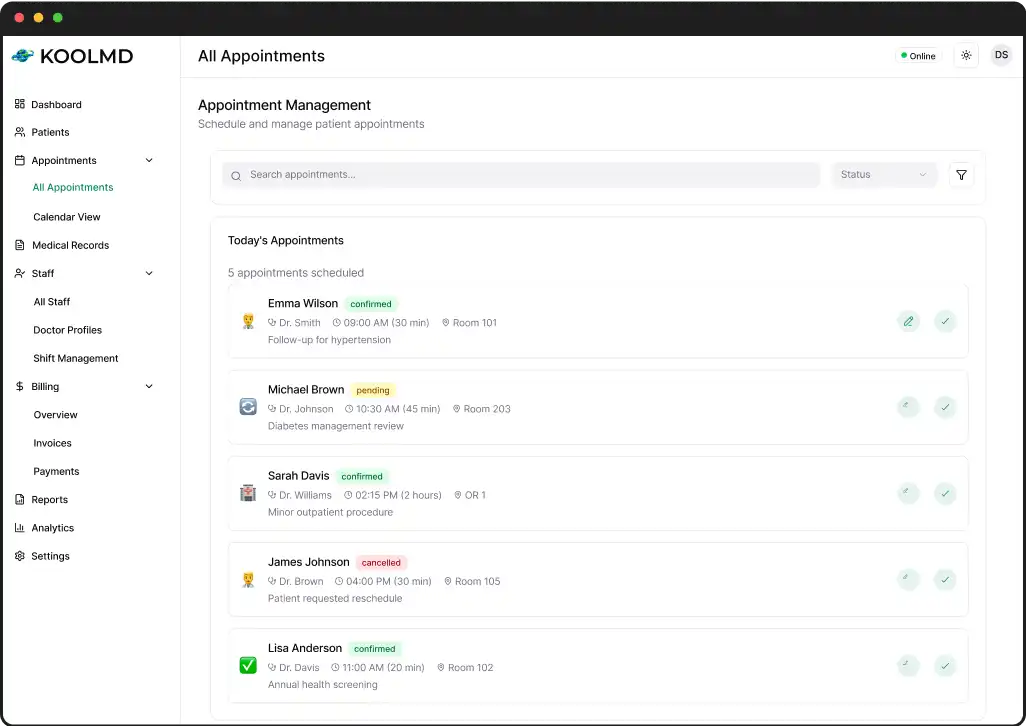
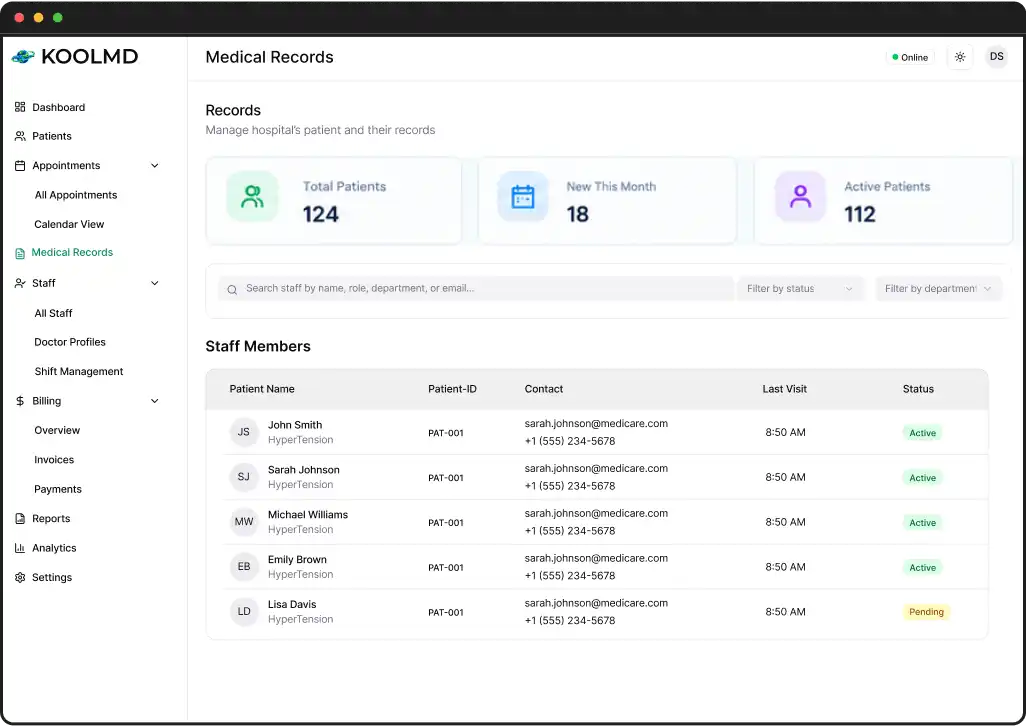
KoolMD is designed around one loop: manage patients, schedule appointments and keep medical records organized in one dashboard.

Patient management dashboard Appointment management screen Medical records dashboard

Patient Management Dashboard

Track total, new and follow-up patients in one dashboard, with search and filters that help staff find any record fast.

Appointment Scheduling

Schedule and manage the day’s appointments with status tags, doctor, time and room details in a single clear list.

Medical Records Management

Store patient records with IDs, conditions and visit history, so care teams can open the right file in seconds.

The Technology Behind This EMR Platform

The EMR and telemedicine platform was shaped around a FHIR-oriented clinical model, API-first services, appointment-linked video care, e-prescribing, lab integration readiness and secure messaging workflows.

Node.js + TypeScript
PostgreSQL
FHIR-Oriented Data
mediasoup Video
WENO eRx
REST APIs & Webhooks

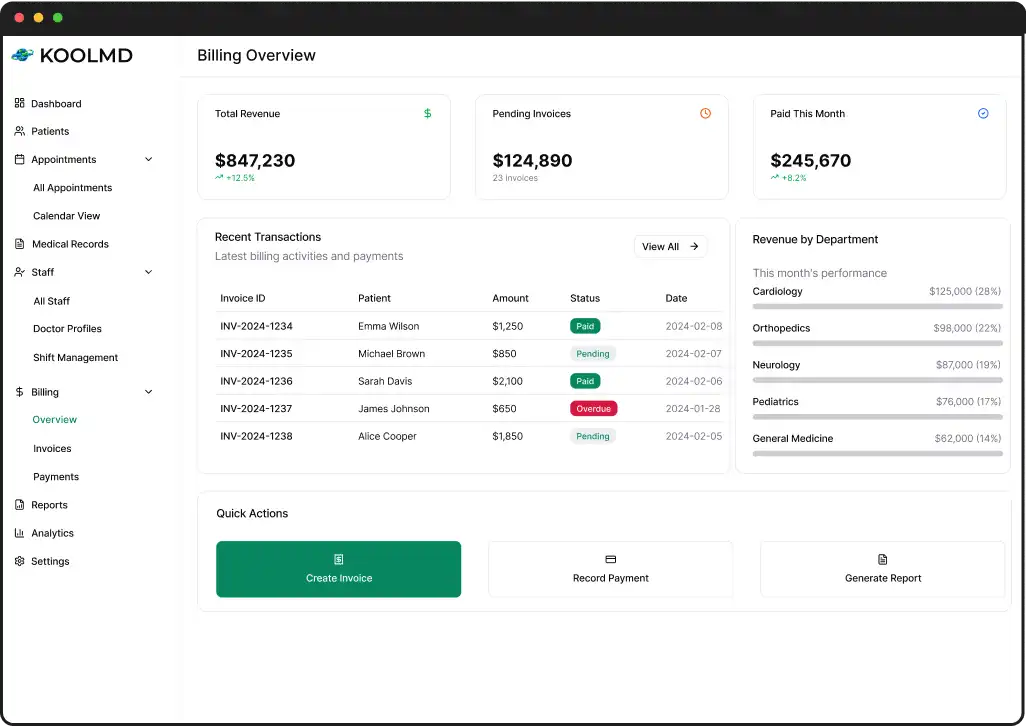
Inside the KoolMD Web Platform — EMR Experience

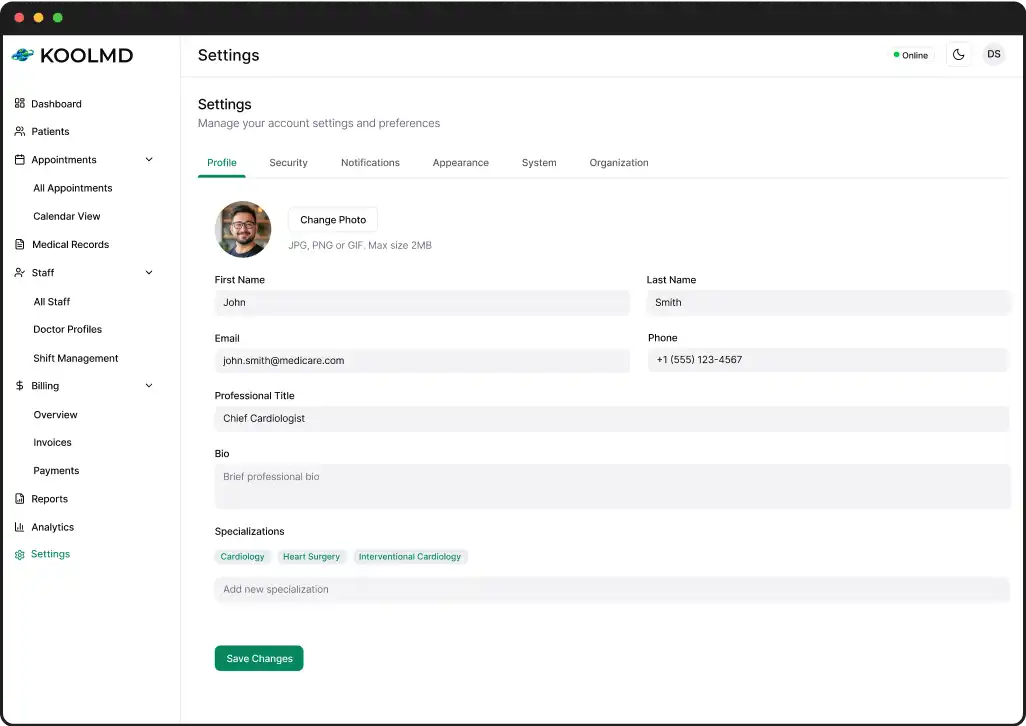
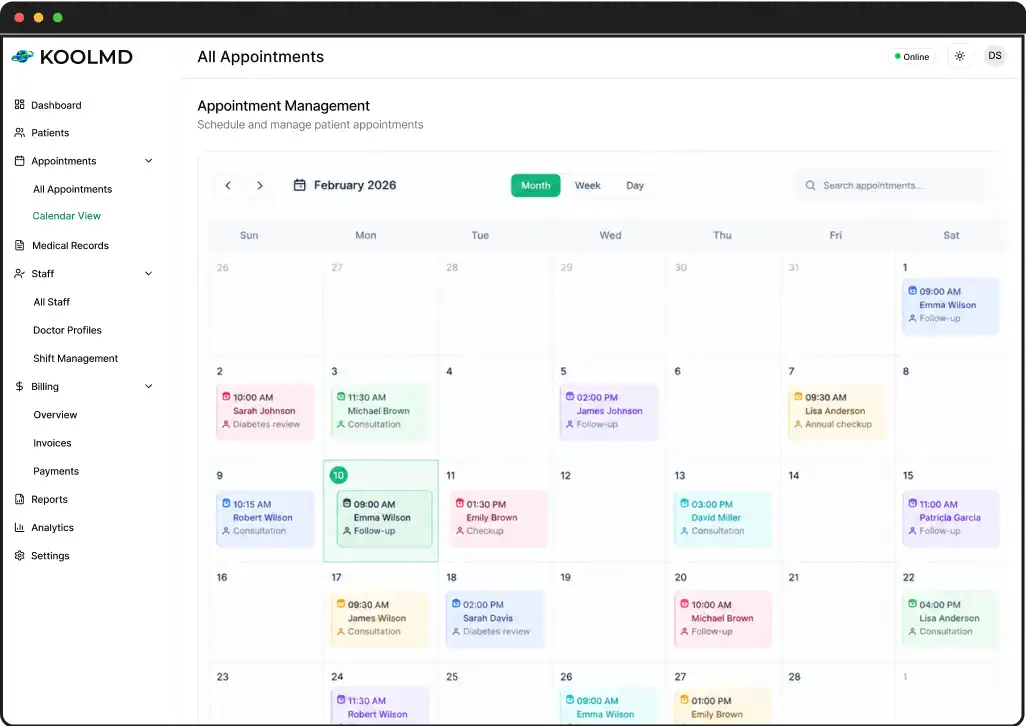
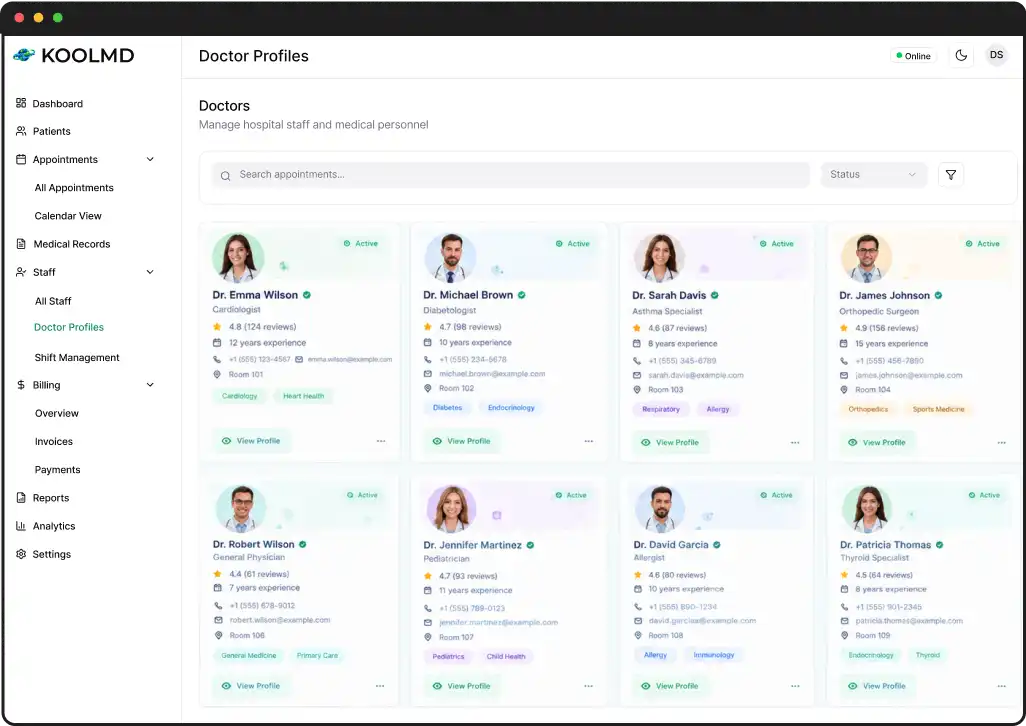
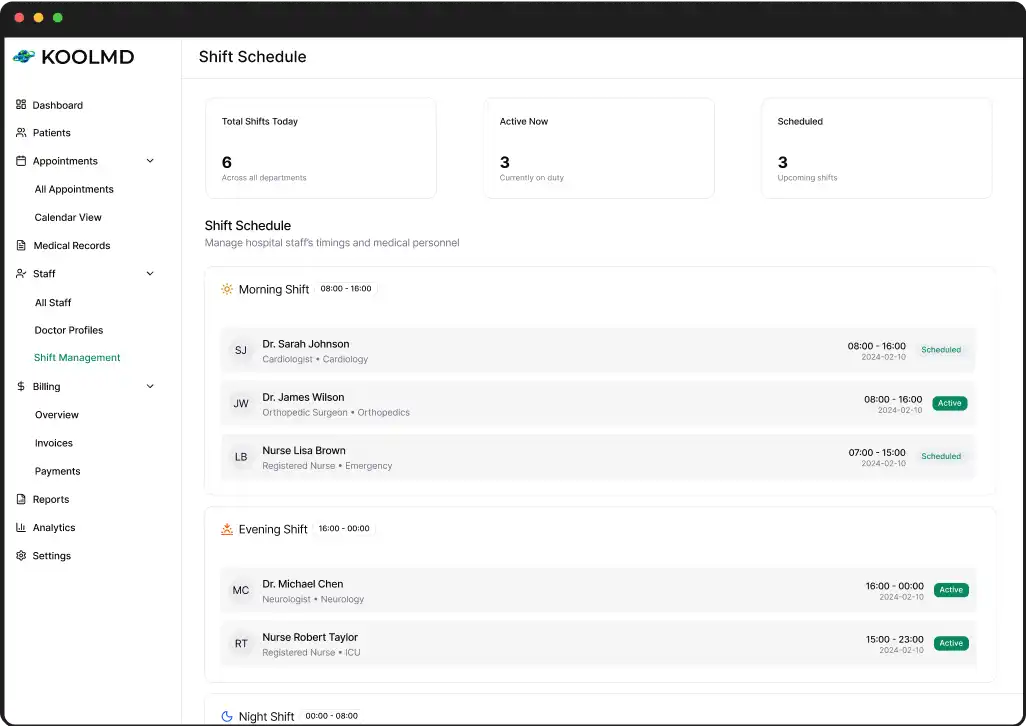
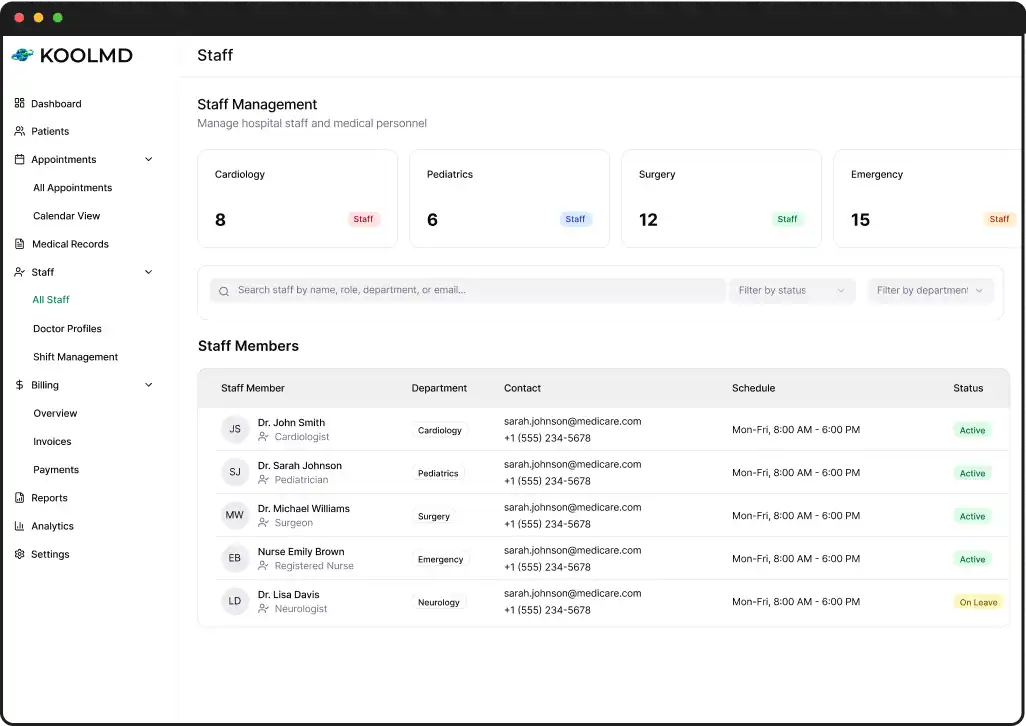
Explore the KoolMD web platform through key screens for billing, appointments, doctor profiles, shift schedules and staff management in one responsive dashboard.

Billing overview dashboard
EMR settings screen
All appointments list
Doctor profiles screen
Staff shift schedule
Staff management screen

Healthcare Workflows Connected in One Platform

The platform connects clinical records, telemedicine, prescriptions, diagnostics, referrals and secure communication around the patient and the complete care journey.

Discuss Your Healthcare Project arrow
01

Patient & Provider Management

Centralize patient profiles, medical information, insurance, provider details, licenses, locations and telemedicine jurisdictions within one connected system.

02

Scheduling & Clinical Encounters

Connect provider calendars, availability, appointments and telemedicine sessions with patient charts, encounters, treatment notes, diagnoses and follow-up workflows.

03

FHIR-Oriented Clinical Data

Structure clinical information around FHIR-oriented resources including patients, practitioners, encounters, observations, conditions, medications, reports and communications.

04

Telemedicine & eRx Workflows

Support appointment-linked video consultations alongside medication management, pharmacy search, prescription workflows and WENO eRx integration.

05

Labs, Referrals & Diagnostics

Connect lab orders and results, diagnostic reports, referrals, imaging orders and supporting documents to the patient and relevant clinical workflow.

06

Secure Patient Communication

Keep internal messaging connected to patients, encounters, appointments, referrals, prescriptions, labs and documents while supporting role-aware access and auditability.

What Drives EMR Platform Development Cost?

EMR platform cost depends on clinical workflows, telemedicine, integrations, security, role-based access, patient features and the technical architecture required to connect them.

Step: 01

Clinical Scope

Patient and provider records, scheduling, encounters, prescriptions, labs, referrals, imaging, billing and patient workflows determine the functional scope of the platform.

Step: 02

Telemedicine & Integrations

Appointment-linked video care, WENO eRx, lab workflows, referrals, imaging and external-system readiness add integration and workflow complexity to the project.

Step: 03

Security & Architecture

API architecture, RBAC, secure messaging, audit controls, notifications, background services and role-specific workspaces influence the technical effort and overall platform complexity.

PRODUCT OUTCOME

A Connected Platform for More Coordinated Care

The platform brings clinical records, care workflows, telemedicine, secure communication and role-specific access into one connected system, giving patients, practitioners, staff and administrators access to the appropriate clinical context.

1

Connected Clinical Context

Patient records, encounters, medications, labs, referrals and communications stay connected across the care workflow.

2

Unified Care Workflows

Scheduling, telemedicine, e-prescribing, diagnostics and referrals work within connected patient and encounter workflows.

3

Role-Specific Workspaces

Practitioners, staff, patients and administrators get workspaces and permissions aligned with their responsibilities.

4

Patient-Centered Communication

Secure messaging connects patients and care teams to appointments, encounters, referrals, prescriptions, labs and documents.

Prefer to talk now?

WhatsApp replies in ~30 min

WhatsApp
or

Prefer Email?

We reply within 24 hours

Frequently Asked Questions — EMR & Telemedicine

These questions cover the platform architecture, FHIR-oriented records, telemedicine, e-prescribing, lab readiness, backend technology, security considerations and patient workflows.

What is the platform?

A connected EMR and telemedicine platform covering clinical records, provider management, scheduling, prescriptions, diagnostics, billing, secure communication and patient self-service.

Does it use FHIR?

Yes. The platform uses a FHIR-oriented data model covering concepts such as Patient, Practitioner, Appointment, Encounter, Observation, Condition, MedicationRequest, DiagnosticReport, ServiceRequest, DocumentReference, Questionnaire, QuestionnaireResponse and Communication.

How is telemedicine handled?

The platform uses mediasoup for appointment-linked doctor and patient video consultations, with a waiting room, join flow, camera and microphone controls, session identity verification, and an appointment-linked consultation record.

Does it support e-prescribing?

Yes. The scope includes WENO Exchange for eRx, pharmacy search, preferred pharmacy selection, patient and provider mapping, prescription workflows, status and history synchronization, and EPCS support where applicable.
Does it support lab integrations?

The platform includes an internal lab module and adapter architecture with Quest, Labcorp, and CPL readiness, along with HL7/FHIR-oriented mapping. This readiness should not be described as a live external connection unless separately verified.

What backend is specified?

The backend uses Node.js, TypeScript, and PostgreSQL with modular architecture, REST APIs, authentication, RBAC, webhooks, background jobs, notifications, and messaging services.

Is it HIPAA compliant?

The scope includes important security foundations, but this case study does not claim formal HIPAA compliance or certification. Compliance also depends on deployment, policies, vendors, BAAs, and ongoing operational controls.

Does the platform include a patient portal?

Yes. The platform includes a patient portal where users can access appointments, medical information, prescriptions, labs, referrals, payments, memberships, documents, questionnaires, and communication with providers.

Let’s Talk Business

Email Address:

[email protected]

Contact Number:

+91-9879595948

Contact Number:

+91-9824614016

Follow Us:

Enter phone number with postal code (e.g., +15673484839).

Choose files
✅ Your message has been sent successfully!
Talk to an Expert