
Founded in
2018
Years of product, mobile and software engineering experience help us design interfaces that consider real users, real workflows and real implementation needs.
 DapkeSocial video app with live streaming and PK battles.
 Lika Real EstateProperty discovery platform for listings and leads.
 BurpoutSocial fitness challenges that keep people moving.
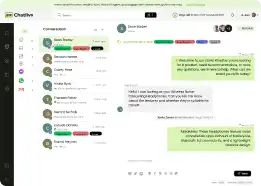
 ChatLivoConnected customer communication SaaS workspace.
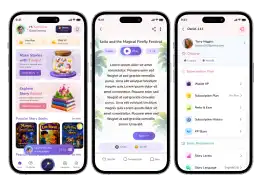
 EmoTalesAI storytelling adventures designed for children.
 EarnifyTrack Income from Multiple Sources with Analytics & Tax Planning.
A mobile product should feel clear, intuitive and easy to use. As a mobile app design company, Primocys creates mobile app UI UX design services around real user journeys—from flows and wireframes to Figma screens, interactive prototypes, and developer-ready design systems for iOS and Android.
Discuss Your App Design






Good mobile design is more than polished screens. Our mobile UX design approach connects user goals, navigation, interaction patterns and edge cases—from mobile app wireframing and user flows to Figma mobile app design, interactive prototypes and reusable design systems.
We organize flows around the user’s goal instead of forcing every available feature onto the first screen.
Visual hierarchy helps users distinguish primary actions, supporting information and secondary choices quickly.
We examine empty states, errors, permissions, loading, onboarding and edge cases—not only ideal happy paths.
Navigation should remain predictable as the product grows rather than becoming a collection of disconnected screens.
Design decisions need states, components and behavior that engineering teams can translate into a working product.
A reusable design system keeps new screens visually consistent instead of forcing the team to redesign patterns repeatedly.
From user flows and wireframes to Figma prototypes and design systems, our mobile app design services are built around real product requirements and developer-ready execution.
2018
Years of product, mobile and software engineering experience help us design interfaces that consider real users, real workflows and real implementation needs.
We build and run our own products too, giving our design team practical insight into real interfaces, product flows, user interactions and ongoing product evolution.

AI-Powered Live Chat for Businesses

AI Stories & Learning Companion for Kids
One design team can take your mobile product from early UX thinking through UI design, prototyping and developer-ready systems without losing consistency between stages.
Every project follows a clear path: understand the product, map user journeys, create wireframes, design the interface, prototype key interactions, then prepare the system for development.
From UX strategy to Figma UI and design systems, Primocys helps businesses create clear, scalable mobile experiences built for real users and teams.
















Bring your idea, Figma, requirements or live app. Our mobile app UI UX design services turn product needs into clear flows, polished UI and developer-ready designs.
01
Understand product goals, target users, business requirements, competitor patterns and the key tasks the interface needs to support.
02
Map how users move through onboarding, core actions, account flows, transactions and other important product journeys.
03
Turn product requirements into low-fidelity layouts before visual styling makes structural changes expensive.
04
Create polished mobile screens with deliberate hierarchy, spacing, typography, components, states and brand expression.
05
Connect key screens into an interactive experience so stakeholders can review important journeys before development.
06
Create reusable components, variants, states and visual rules that keep the application consistent as more screens are added.
See how we designed booking, messaging and fitness apps, each built around clear user workflows and real product needs.
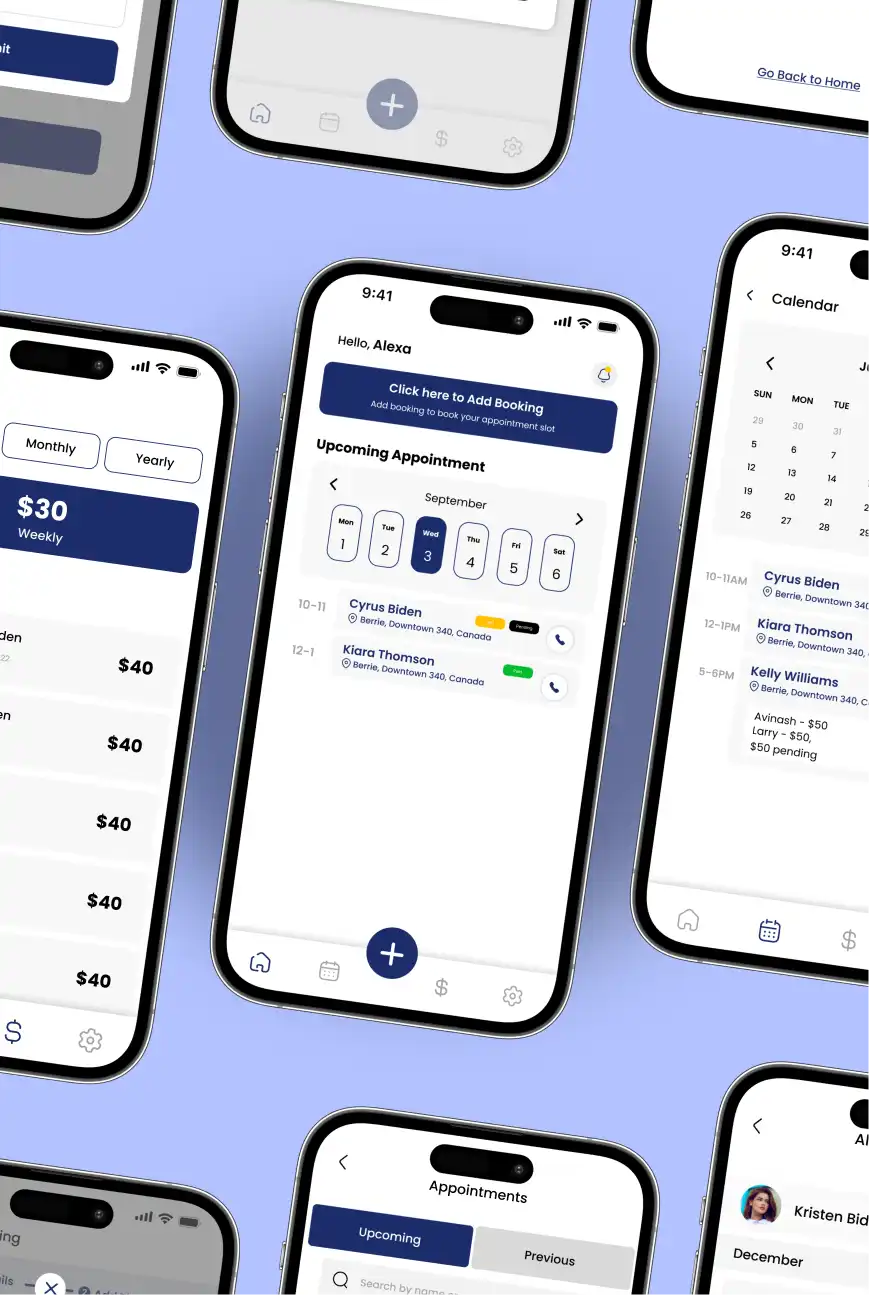
Service providers managing bookings, client visits and payments across calls, notes and spreadsheets had no single place to see their day and earnings.
We designed a booking app with a quick add-booking action, upcoming appointments by day, a calendar view, payment status tags and weekly, monthly and yearly earnings.
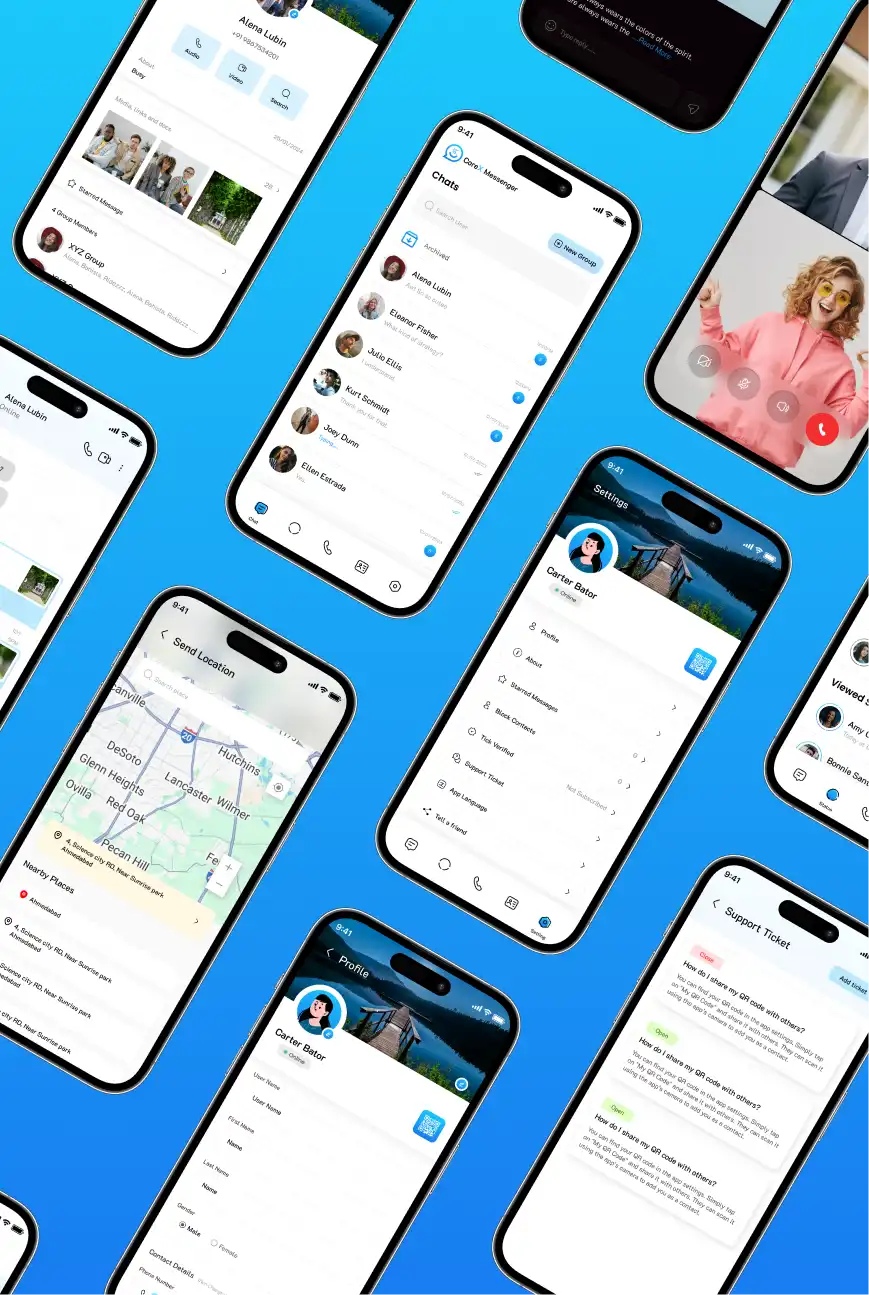
A messaging app has to feel fast and familiar while handling chats, calls, media and account settings without overwhelming users on a small screen.
We designed a messenger with a clean chat list, archived chats, group creation, voice and video calls, location sharing, QR-based profiles and in-app support tickets.
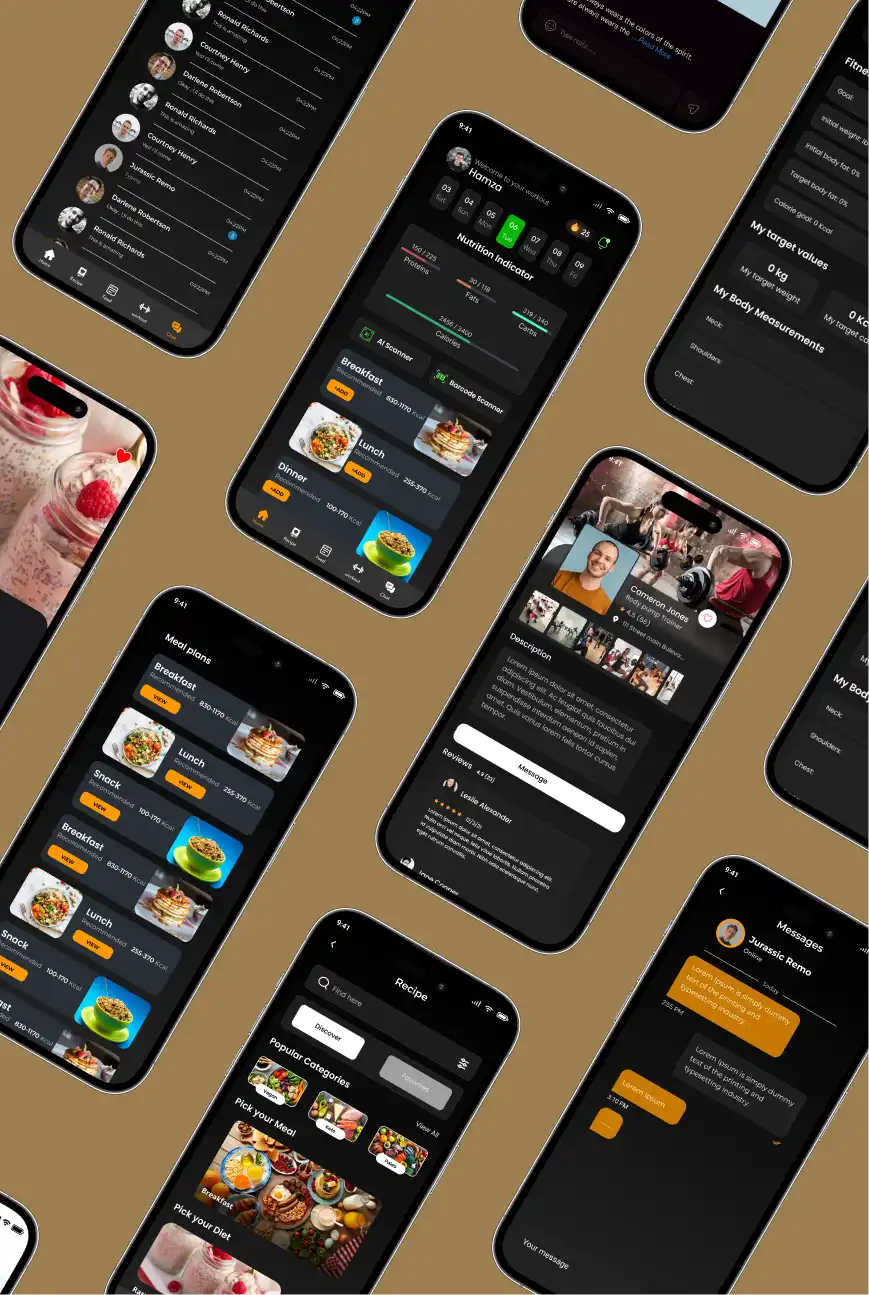
Fitness users wanted nutrition, workouts and trainer support in one app instead of switching between calorie trackers, recipe sites and messaging apps.
We designed a dark-mode fitness app with a daily nutrition indicator, meal plans, recipes, AI and barcode scanning, trainer profiles with reviews and direct messaging.
A strong mobile app design service covers more than polished screens. Our mobile UX design approach considers onboarding, discovery, payments, communication, media and the everyday states that make an app feel complete and easy to use.
Sign up, login, OTP, social authentication, permissions, profile setup and first-use guidance.
Feeds, dashboards, search, recommendations, categories, filters and content discovery patterns.
Product selection, carts, subscriptions, checkout, payment states, wallets and transaction history.
Profiles, chat, groups, calls, notifications, comments, followers and community interactions.
Short video, stories, uploads, streaming, gifts, creator tools and content interactions.
Design what happens when there is no data, something is processing, permission is missing or an action fails.




Our B2B and B2C platform helps Nigerian manufacturers sell at wholesale prices and suppliers offer competitive retail pricing, with a strong focus on Made in Africa products and easy local and international distribution. The app has received excellent user reviews for its design and unique features. Communication with the Primocys team was smooth in an agile setup, even beyond office hours when needed. Their mobile app development expertise is excellent—highly professional and reliable.
We hired Primocys to develop a highly complex and specialized mobile application, and they delivered outstanding results. The app includes advanced features such as timeline mixers, classifieds, payments, advertisements, GPS functionality, and more. Their technical skills, timely delivery, availability, and the personal attention Arpan Sagar brings to each project truly stand out. The team stays focused and committed from start to finish—an excellent experience overall.
The dating app was delivered successfully and approved by both Apple App Store and Google Play. Our users are highly impressed with the design, UI, and overall functionality. The project was well planned with clear milestones, and all modules were delivered on time. The team is talented, patient, and flexible, accommodating multiple scope revisions as requirements evolved. Their 24/7 development and support availability made the entire process smooth and reliable.
Great team with excellent communication and a strong commitment to on-time delivery. They developed a fully customized mobile app for both Android and iOS, perfectly matching our requirements. The entire process was smooth and professional, with clear updates at every stage. They are reliable, skilled, and very easy to work with. We’re continuing our partnership on more projects, and choosing them has been one of the best business decisions I’ve made.
Good design makes your app easier to use, easier to build and easier to grow, with clear flows, consistent interfaces and developer-ready handoff.
Give users a clear path through your app with simple flows, strong hierarchy and navigation that makes the next action obvious.
Design onboarding, permissions and first-use guidance so new users understand your product and reach its value faster.
Use reusable components, states and design tokens so every screen feels like one product as your app grows.
Make everyday tasks smooth with thoughtful states, feedback and interactions that give users a reason to come back.
Hand developers Figma files with clear specs, components and behaviors, so implementation needs fewer assumptions and less rework.
Build a design foundation that supports new features, screens and platforms without redesigning the product every time.
We design in Figma and keep Flutter, React Native and native iOS/Android in mind, so every interface is realistic to build.
A scalable mobile app design system keeps UI patterns consistent, simplifies development and helps teams expand the product without redesigning common elements.
Typography, spacing, color, elevation, iconography and other visual rules used throughout the interface.
Buttons, inputs, cards, tabs, navigation, modals, lists and other repeatable UI building blocks.
Default, active, disabled, selected, loading, error and other states developers need to implement behavior accurately.
Reusable approaches for forms, search, filters, confirmation, onboarding, permissions and common mobile interactions.
Account for appropriate iOS and Android conventions instead of forcing every interaction to behave identically.
Make it easier to add future modules while preserving visual and interaction consistency across the product.
Starting with mobile app wireframing and structure before visual styling helps us build a stronger product flow. Our Figma mobile app design then turns that structure into clear, usable interfaces.
When mobile app design services and engineering are aligned, design decisions are easier to implement and scale. Our mobile app UI UX design approach stays grounded in how real mobile applications are built and evolved.
Talk to Our Design Team
Design work informed by hands-on delivery across iOS, Android and cross-platform mobile products.
UI/UX, mobile development, backend engineering and integrations can remain aligned under one delivery team.
Review shipped work across social, AI, SaaS, communication, fitness and other mobile product categories.
Review flows and interfaces before expensive engineering decisions are locked into production code.
Experience with feature-dense products involving live communication, media, monetization, AI and multi-role workflows.
When required, the same product organization can move from approved design into full mobile app development.
Exact deliverables depend on scope, but our mobile app design services can include usable product assets such as flows, wireframes, mobile app prototype design and developer-ready UI—not just presentation images.
Visual representation of important journeys and how screens connect.
Low-fidelity layouts for validating structure and flow before detailed visual design.
Final visual interface designs for the screens and states included in the agreed scope.
Clickable representation of important flows for review, presentation and pre-development validation.
Reusable foundations and components appropriate to the size and complexity of the product.
Organized designs and relevant specifications to help engineering implement the approved experience.
Mobile app UI/UX design cost depends on product scope, number of flows, platforms, design depth and handoff needs. We scope it around your product.
More screens, user journeys and edge cases mean more time for flow mapping, wireframes, UI design and review cycles.
Clear requirements speed up design, while early ideas need extra discovery and structuring before screens can begin.
Designing for iOS, Android and different device sizes adds platform-specific patterns, layouts and review effort.
Custom illustrations, motion and branded components take more time than simpler, system-based interfaces.
A full component library, documented states and developer-ready specifications add work but reduce rework during development.
Design-only projects are scoped separately from design plus engineering, so we confirm whether you need handoff files or full app development.
Find answers about mobile app UI/UX design, Figma deliverables, prototypes, design systems, app redesign, cost, timeline and development after design.
Turn your product idea into clear flows, polished UI and developer-ready Figma designs with a mobile UI/UX team built around real product needs.
Start Your App Design
Services to help businesses establish and enhance their online presence.
Contact Us
Hear from our clients and why 1200+ businesses trust Primocys

"Our B2B and B2C platform helps Nigerian manufacturers sell at wholesale prices and suppliers offer competitive retail pricing, with a strong focus on Made in Africa products and easy local and international distribution. The app has received excellent user reviews for its design and unique features. Communication with the Primocys team was smooth in an agile setup, even beyond office hours when needed. Their mobile app development expertise is excellent—highly professional and reliable."
"The dating app was delivered successfully and approved by both Apple App Store and Google Play. Our users are highly impressed with the design, UI, and overall functionality. The project was well planned with clear milestones, and all modules were delivered on time. The team is talented, patient, and flexible, accommodating multiple scope revisions as requirements evolved. Their 24/7 development and support availability made the entire process smooth and reliable."
" We hired Primocys to develop a highly complex and specialized mobile application, and they delivered outstanding results. The app includes advanced features such as timeline mixers, classifieds, payments, advertisements, GPS functionality, and more. Their technical skills, timely delivery, availability, and the personal attention Arpan Sagar brings to each project truly stand out. The team stays focused and committed from start to finish—an excellent experience overall."
" Great team with excellent communication and a strong commitment to on-time delivery. They developed a fully customized mobile app for both Android and iOS, perfectly matching our requirements. The entire process was smooth and professional, with clear updates at every stage. They are reliable, skilled, and very easy to work with. We’re continuing our partnership on more projects, and choosing them has been one of the best business decisions I’ve made."
AWARDS
TRUSTED BY GLOBAL BRANDS