


Diners Need Proof Before They Book
Guests compare menus, photos, ratings and distance first. Reviews inside an app for restaurant booking help them reserve with confidence.
 DapkeSocial video app with live streaming and PK battles.
 Lika Real EstateProperty discovery platform for listings and leads.
 BurpoutSocial fitness challenges that keep people moving.
 ChatLivoConnected customer communication SaaS workspace.
 EmoTalesAI storytelling adventures designed for children.
 EarnifyTrack Income from Multiple Sources with Analytics & Tax Planning.
Planning a restaurant booking app that does more than list venues? See how we built one: diners find a restaurant and book a table, owners run reservations and subscriptions, and administrators control the marketplace and its revenue from one place.
Launch a restaurant booking app where guests reserve tables, owners manage bookings and you earn revenue. White-label Flutter with optional subscriptions.
Find, decide, reserve. Categories, maps, menus, reviews, three booking styles, favourites and booking history.
Own the daily workflow. Update listings, arrange tables, respond to reviews, handle bookings and review performance.
Grow and monetize. Approve vendors, moderate content, configure plans, process subscription billing and monitor revenue.
Launch under your brand. Flutter apps for iOS and Android, a NestJS backend with a REST API, and vendor and admin portals, in 10 languages including Arabic RTL.
Diners want confidence, restaurants want workable reservations, and you want revenue. See how we built one restaurant booking platform that delivers all three.
We developed a complete restaurant booking platform connecting diners, restaurant owners and administrators through flexible table reservations, dedicated portals and subscription management.
Mapped diner, restaurant owner and admin journeys into one connected experience, covering restaurant discovery, availability checks and confirmed table bookings.
Built Flutter apps for iOS and Android with nearby restaurant search, maps, menus, reviews, favourites and 10-language support, including Arabic RTL.
Implemented three reservation modes: request-based approval, seat-capacity booking and table-specific reservations, with database-level conflict checks to prevent overlapping bookings.
Enabled restaurant owners to manage listings, menus, tables, availability, booking requests, customer reviews and promotions through a dedicated dashboard.
Integrated free, freemium and paid-to-publish plans with trials, renewals and invoices, supporting Stripe, PayPal, Razorpay and bank transfers.
Developed a NestJS REST API with PostgreSQL and PostGIS, supporting vendor approvals, content moderation, push campaigns, analytics and audit logs.
A restaurant booking app must earn diner trust, adapt to each venue’s reservation rules and grow revenue, while preventing double bookings from day one.
Guests compare menus, photos, ratings and distance first. Reviews inside an app for restaurant booking help them reserve with confidence.
Some venues approve requests, others sell seats or assign tables. One fixed flow fails, and double bookings must be blocked at the backend.
Vendor approvals, subscription plans, renewals and moderation need backend control, so marketplace growth never becomes manual work.
This restaurant booking app separates the diner app, vendor portal and admin panel, all connected to one secure NestJS API, so booking rules, billing and permissions are enforced in the backend.
One Flutter codebase for iOS and Android: search, menus, reviews, table booking and history in 10 languages, including Arabic RTL.
Reservation rules, nearby search and conflict protection run on NestJS and PostgreSQL/PostGIS to help prevent double bookings.
Web portals let owners and admins manage listings, bookings and moderation, with Stripe, PayPal, Razorpay and bank-transfer billing.
This app for restaurant booking combines discovery, three reservation modes, menus, reviews and multilingual support, so diners book with confidence and venues keep control of their own booking rules.
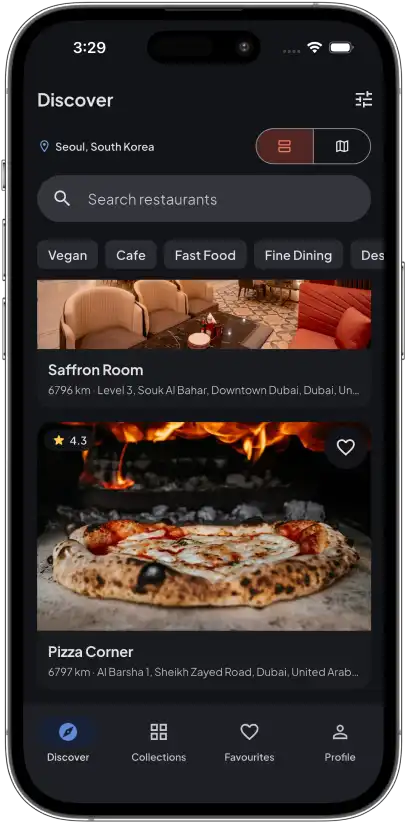
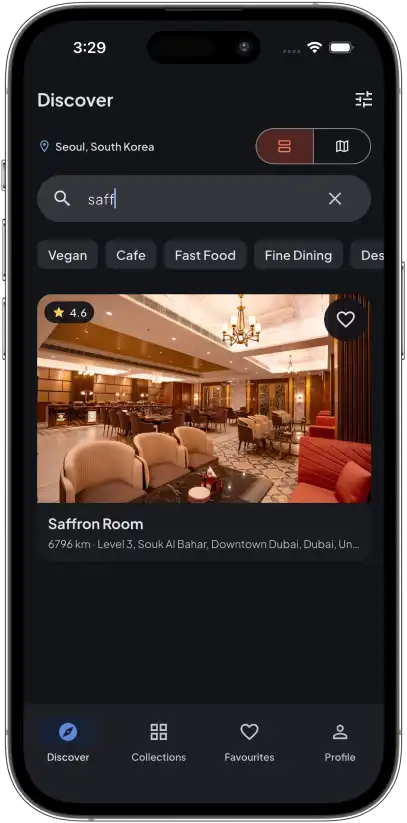
Browse by category, nearby results, map and filters, with typo-tolerant search in English or Arabic, to find the right restaurant fast.
Restaurants choose request approval, seat-based time slots or specific table selection, so one app fits every dining style.
Photos, hours, directions, calling and organized menus, or zoomable menu images, answer key questions before guests arrive.
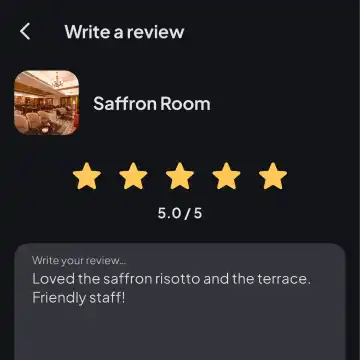
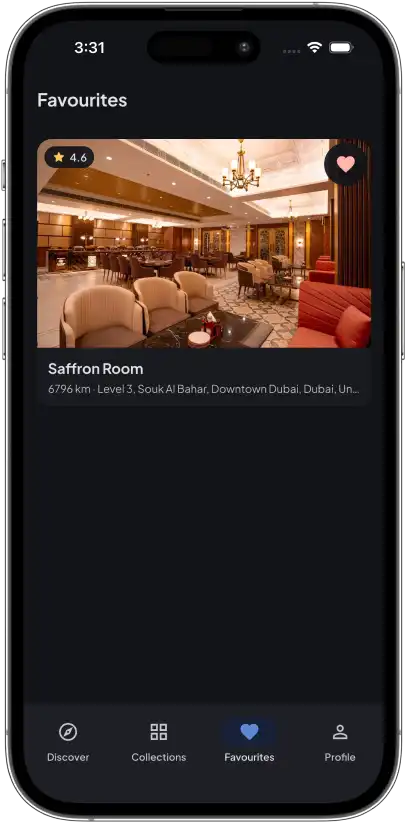
Ratings, customer reviews, saved favourites and booking history help diners revisit places and choose with more confidence.
English, Arabic, German, Spanish, French and five more languages, with full right-to-left layout, prepare launches in new markets.
Push notifications keep diners updated, while owners confirm or reject requests and record no-shows from the vendor portal.
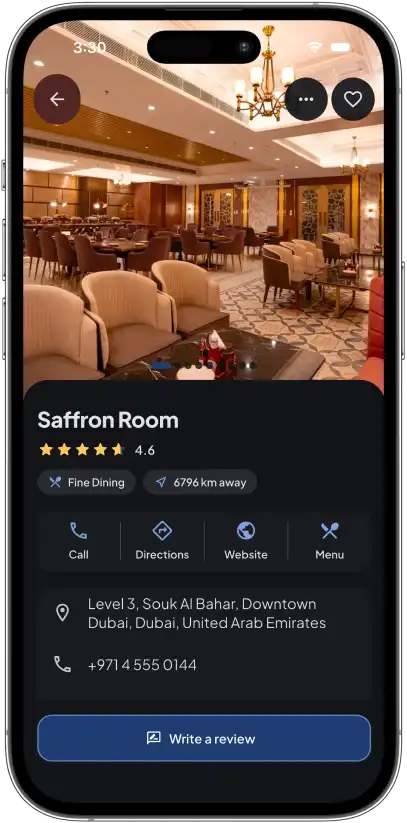
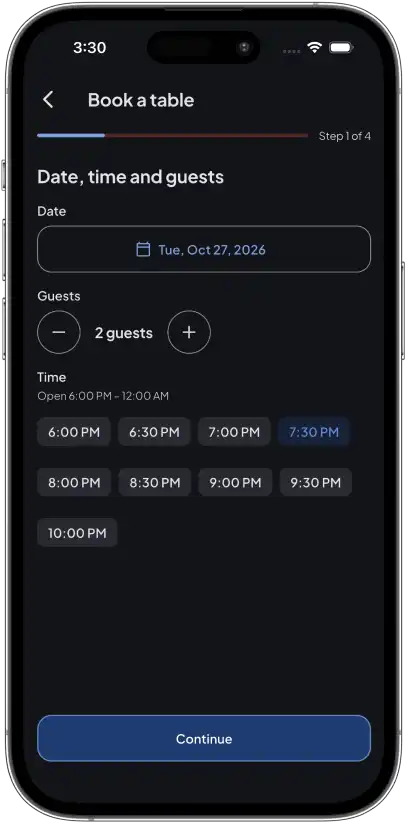
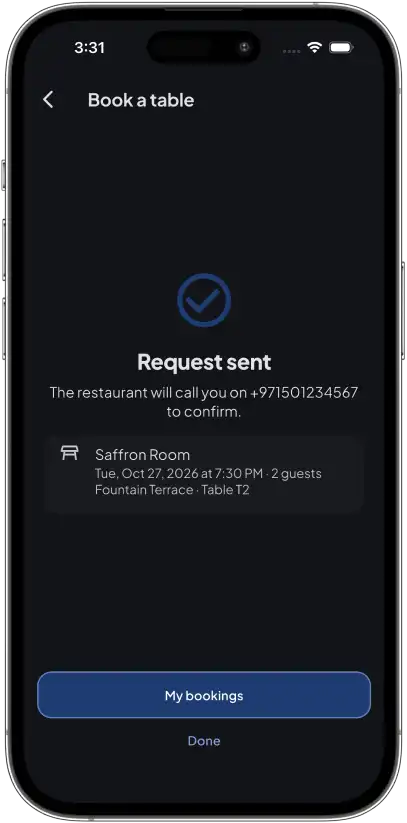
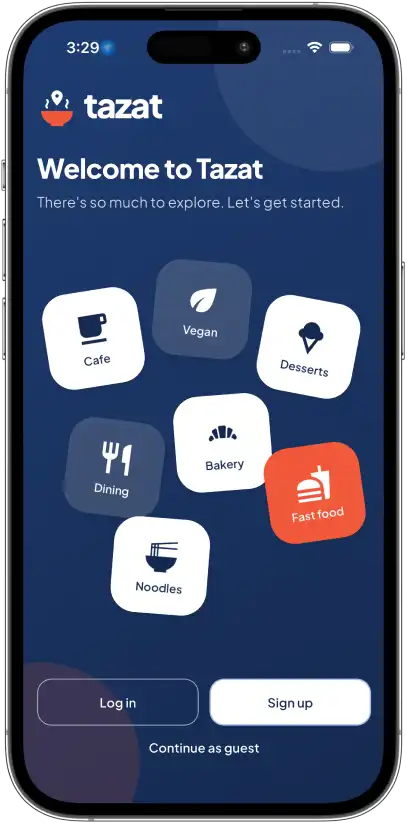
This restaurant booking app guides diners through one clear flow: browse collections, filter by cuisine, check a venue profile, choose a time and send a table request.
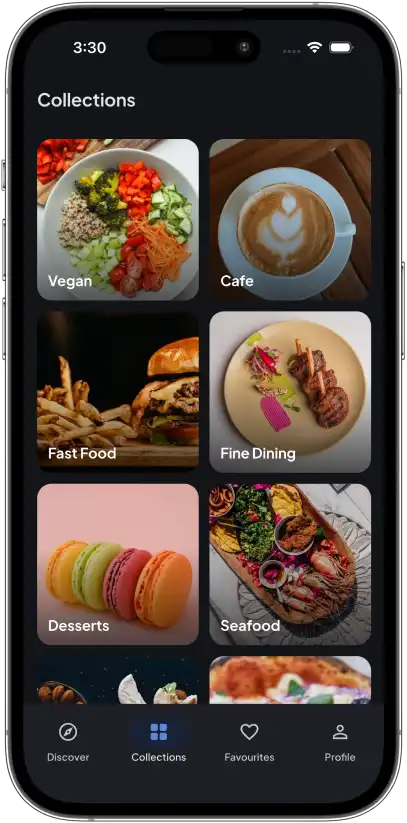
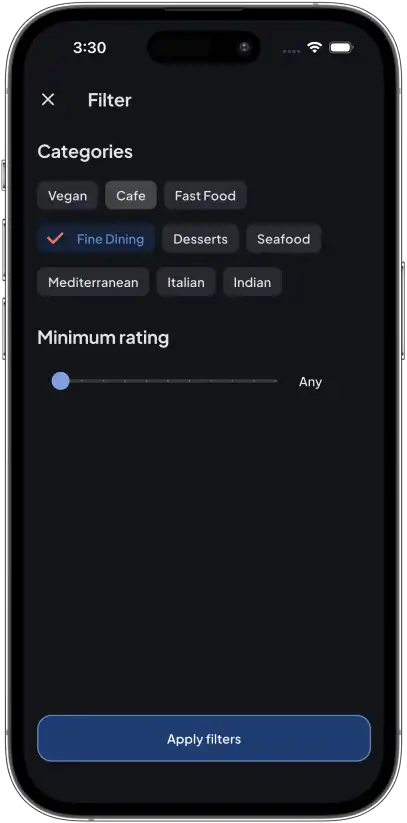
Visual collections like Vegan, Cafe, Fine Dining and Seafood let diners start with a craving instead of a blank search box.
Cuisine chips and a minimum-rating slider narrow the list fast, so diners only see restaurants worth considering.
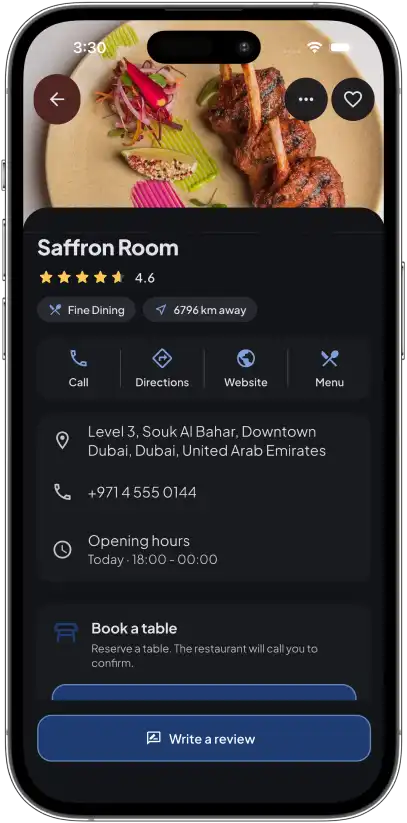
Photos, rating, distance, call, directions, website and menu sit in one place, with a Write a review button close by.
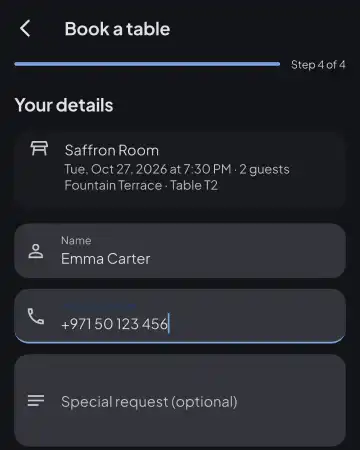
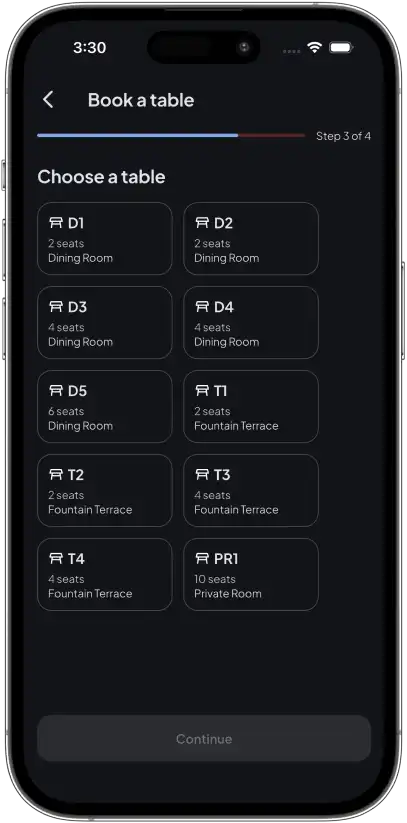
Step 1 sets the date, party size and open time slots, so guests only choose times the restaurant actually offers.
The screen says the restaurant will call to confirm, summarizes venue, time, guests and table, and links to My bookings.
Our restaurant booking app development stack combines Flutter, NestJS, PostgreSQL/PostGIS, Firebase, Docker and secure payment gateways to power reservations, vendor tools and restaurant subscriptions.
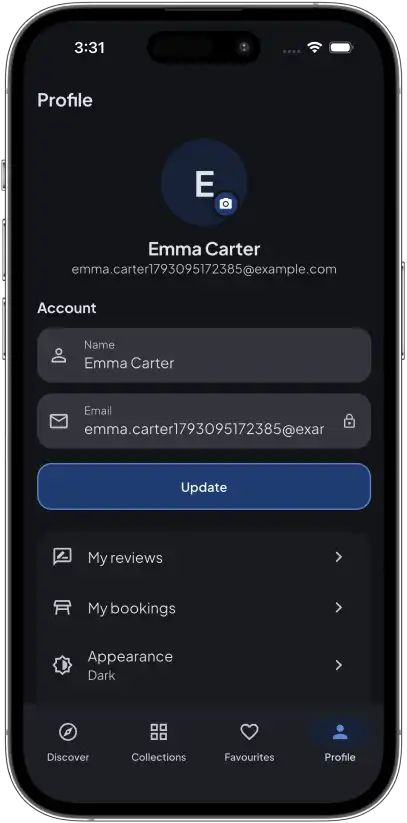
Explore this app for restaurant booking, from guest access and search to restaurant details, table selection, favourites and profiles, designed to take diners from first search to a sent request.
When restaurants get busy, the dashboard makes the next action obvious. Owners manage menus, tables and promotions, then switch to a booking view built around today’s arrivals.
Keep photos, logo, video, opening hours, discounts and English/Arabic menus current from one dashboard.
Set booking mode, areas, tables and slot capacity, then confirm or reject requests and log walk-ins or no-shows.
A badge, banner and chime flag new bookings while the portal is open, so today’s arrivals are easy to review.
Reply to reviews, report unfair content and send promotional push deals to users who liked the restaurant.
Track listing views, likes and ratings, and export CSV reports for deeper analysis and planning.
Promotions, analytics and media uploads can follow the platform’s subscription plans, so features scale with each tier.
A directory can attract restaurants, but revenue needs more than a paywall. Choose Free, Freemium or Paid-to-Publish modes, then set monthly or annual plans with trials and tier-based feature limits.
Restaurant owners can pay for subscription plans through Stripe, PayPal, Razorpay or bank transfer. Each option suits different markets and billing flows, so you can match them to your launch country.
| Gateway | Coverage | Practical note |
|---|---|---|
| Stripe | Cards, Apple Pay and Google Pay | Supports plan changes, including prorated upgrades. |
| PayPal | Recurring web subscriptions | Mid-term plan switches need cancellation and resubscription. |
| Razorpay | Cards and UPI AutoPay | Mid-term plan switches need cancellation and resubscription. |
| Bank transfer | Manual bank payment workflow | Extra payment option with invoice tracking. |
Subscription checkout happens on the web. The diner app has no in-app purchases and shows no subscription prices. Gateway accounts, country availability and live payment testing remain the operator’s responsibility.
Admins govern the platform while restaurants keep control. Reminder emails are English-first with an Arabic paragraph, live vendor alerts need the portal open, and SMS or WhatsApp is not included.
Approve vendors and manage listings, users and reviews using report queues, banned words, auto-hide limits and bulk actions.
Track reservations, no-shows and popular venues, and run English/Arabic push campaigns with audience targeting and delivery history.
Use 7-, 30- and 90-day dashboards, CSV exports, subscription analytics, an audit log, health reporting and a guided first-run setup.
Answers about restaurant booking app development, from table booking modes and vendor tools to subscriptions, languages, cost and how Primocys helps you launch.
Contact Us
Hear from our clients and why 1200+ businesses trust Primocys

"Our B2B and B2C platform helps Nigerian manufacturers sell at wholesale prices and suppliers offer competitive retail pricing, with a strong focus on Made in Africa products and easy local and international distribution. The app has received excellent user reviews for its design and unique features. Communication with the Primocys team was smooth in an agile setup, even beyond office hours when needed. Their mobile app development expertise is excellent—highly professional and reliable."

"The dating app was delivered successfully and approved by both Apple App Store and Google Play. Our users are highly impressed with the design, UI, and overall functionality. The project was well planned with clear milestones, and all modules were delivered on time. The team is talented, patient, and flexible, accommodating multiple scope revisions as requirements evolved. Their 24/7 development and support availability made the entire process smooth and reliable."

" We hired Primocys to develop a highly complex and specialized mobile application, and they delivered outstanding results. The app includes advanced features such as timeline mixers, classifieds, payments, advertisements, GPS functionality, and more. Their technical skills, timely delivery, availability, and the personal attention Arpan Sagar brings to each project truly stand out. The team stays focused and committed from start to finish—an excellent experience overall."

" Great team with excellent communication and a strong commitment to on-time delivery. They developed a fully customized mobile app for both Android and iOS, perfectly matching our requirements. The entire process was smooth and professional, with clear updates at every stage. They are reliable, skilled, and very easy to work with. We’re continuing our partnership on more projects, and choosing them has been one of the best business decisions I’ve made."

AWARDS



TRUSTED BY GLOBAL BRANDS