







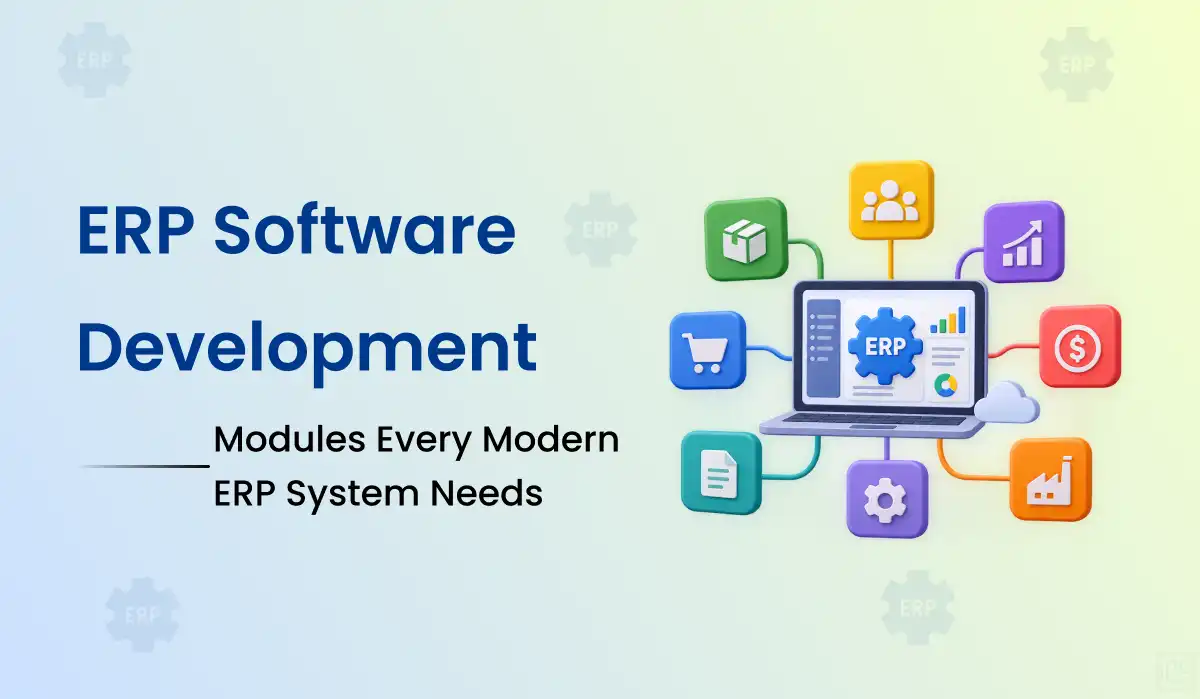
An ERP system should make work easier across departments—not give every team another place to enter the same data. Here are the ERP modules that matter, how they connect and what to build first.
Whether you are planning custom ERP development, modernizing an older platform or comparing ERP products, this guide will help you prioritize the workflows that keep your business running.
What Is ERP Software Development?
Enterprise resource planning (ERP) software connects core business operations through shared processes, records and reporting. The value is not in having the most modules; it is in helping departments work from consistent information.
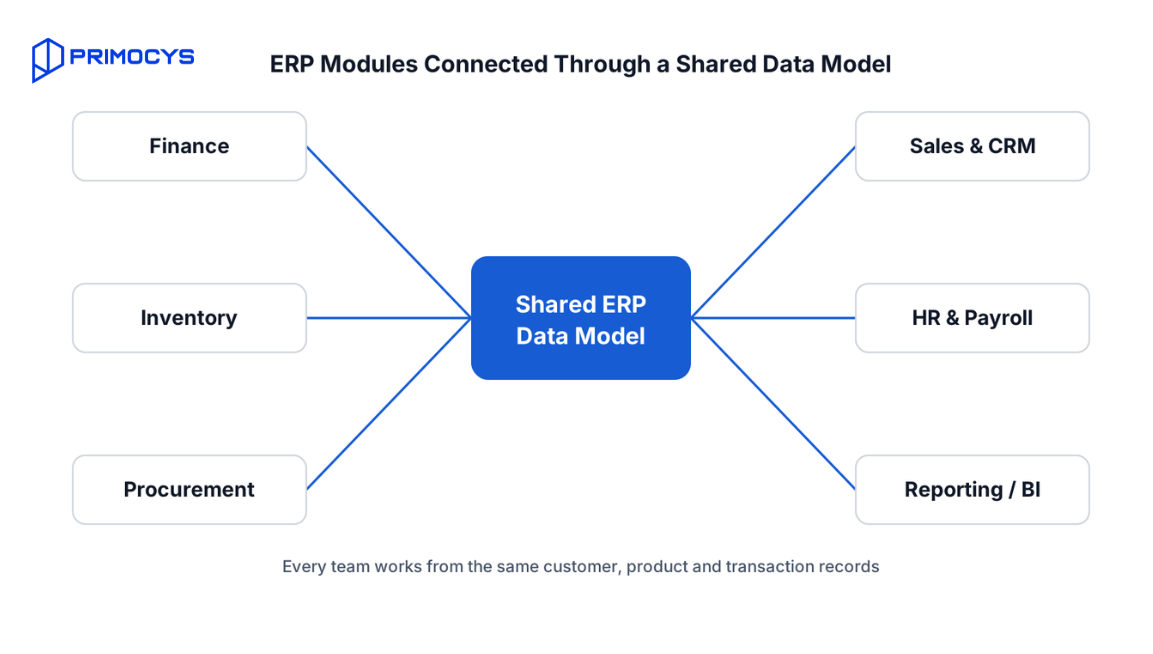
ERP software modules are the functional building blocks—such as finance, inventory, procurement, sales, HR and reporting—that share one data model, so every team sees the same customer, product and transaction records.
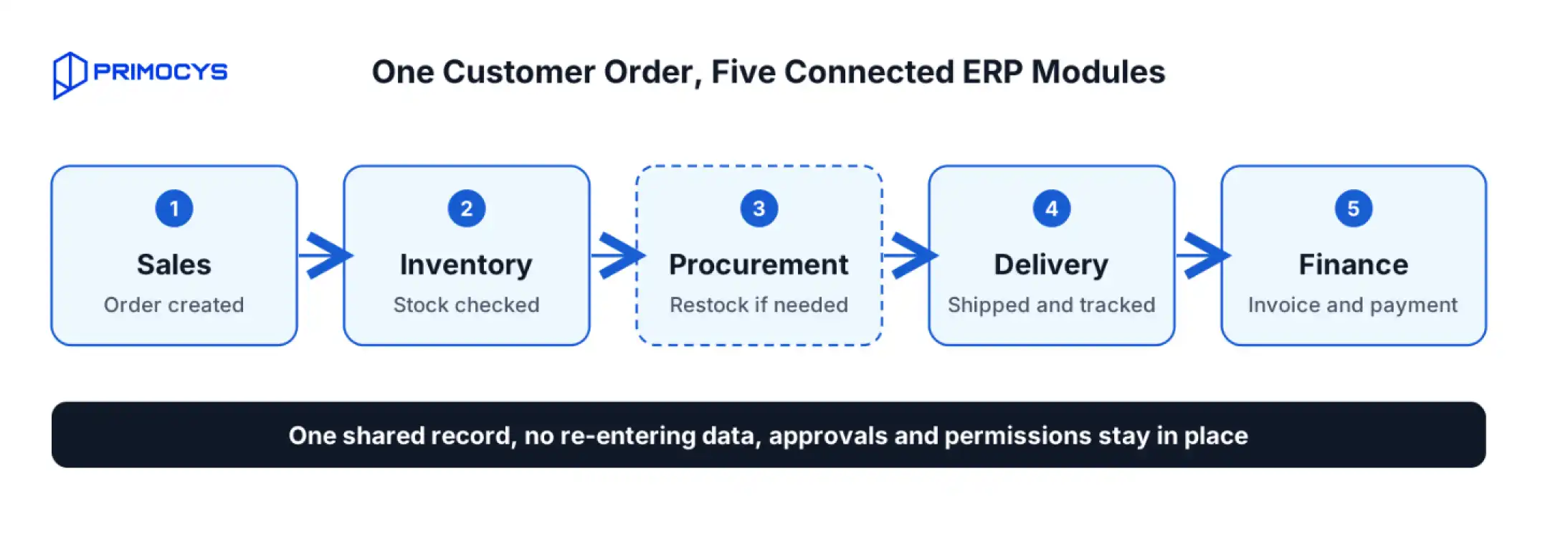
Imagine a customer order moving from sales to inventory, procurement, delivery and finance. Without integration, people retype details, reconcile spreadsheets and chase status updates. A well-designed ERP lets those teams work through connected records while keeping the right approvals and permissions in place.
Custom ERP development can be useful when standard software does not fit important workflows, but it also creates long-term responsibilities for maintenance, security, integrations and change management. Start by deciding what genuinely needs to be custom.
12 Essential ERP Modules for Modern Businesses
Not every company needs all twelve ERP modules at launch. Use this ERP system modules list as a decision framework: prioritize the modules that solve real operational problems and connect the most important data.
Finance & Accounting
General ledger, accounts payable and receivable, budgeting, invoicing, tax configuration, reconciliations and financial reporting.
Primary users: Finance teams, controllers and leadership.
Implementation focus: Approval rules, audit trails, bank/payment connections and reporting consistency.
Inventory & Warehouse Management
Stock levels, receipts, transfers, lot or serial tracking, reorder points, cycle counts and warehouse movements.
Primary users: Warehouse, supply chain and operations teams.
Implementation focus: Real-time stock visibility, barcode workflows and exception handling.
Procurement & Vendor Management
Purchase requests, purchase orders, vendor records, approval routing, goods receipt and supplier performance.
Primary users: Purchasing and operations teams.
Implementation focus: Three-way matching, budget checks and purchasing controls.
Sales & CRM
Lead and opportunity tracking, quotations, orders, customer records, pricing rules and after-sales coordination.
Primary users: Sales, account management and support.
Implementation focus: A clean handoff from quote to order, invoice and fulfillment.
Human Resources & Payroll
Employee records, attendance, leave, onboarding, roles, performance and payroll integrations or region-specific payroll logic.
Primary users: HR, payroll and department managers.
Implementation focus: Privacy, local labor requirements and access boundaries.
Order Management & Fulfillment
Sales orders, order statuses, allocations, shipping, returns and customer communication.
Primary users: Sales operations, warehouse and support.
Implementation focus: Consistency between promised availability and actual fulfillment.
Manufacturing & Production
Bills of materials, work orders, routing, material requirements, shop-floor updates and quality checkpoints.
Primary users: Manufacturers and production planners.
Implementation focus: Traceability, capacity planning and controlled changes.
Project & Resource Management
Projects, tasks, time tracking, budgets, staffing, expenses and project profitability.
Primary users: Service businesses and delivery teams.
Implementation focus: Reliable links between time, costs, billing and margin.
Business Intelligence & Reporting
Dashboards, KPIs, scheduled reports, exports and cross-department analysis.
Primary users: Management and analysts.
Implementation focus: Shared definitions and trustworthy source data.
Asset & Maintenance Management
Asset registers, depreciation inputs, maintenance plans, service requests and equipment history.
Primary users: Facilities, IT and operations.
Implementation focus: Asset lifecycle visibility and downtime tracking.
Document & Workflow Management
Approvals, attachments, version history, notifications, forms and configurable business rules.
Primary users: All departments.
Implementation focus: Clear ownership, retention policies and traceable decisions.
Customer & Supplier Portals
Self-service access to orders, invoices, statements, requests, documents and status updates.
Primary users: Customers, suppliers and partner teams.
Implementation focus: Role-based access and a consistent external experience.
Which ERP Modules Should You Build First?
Start with one end-to-end business process. A focused ERP MVP that works reliably is more useful than twelve half-connected modules.
| Business type | Likely starting modules | Common next phase |
|---|---|---|
| Trading / distribution | Inventory, sales orders, procurement, finance | Warehouse automation, supplier portal, BI |
| Manufacturing | Inventory, procurement, production, finance | Quality, maintenance, planning, BI |
| Professional services | Projects, time, billing, finance | CRM, resource planning, analytics |
| Retail / multi-location | Inventory, sales, purchasing, finance | Multi-location reporting, loyalty integrations |
| Healthcare operations | Purchasing, inventory, billing, staff workflows | Specialized clinical integrations and reporting |
Practical rule: Choose the first release based on business value, data readiness, integration dependencies and adoption—not module count.
ERP Architecture and Integration Essentials
Modules become an ERP when they share trustworthy data and clear responsibilities. Integration decisions made early can prevent expensive rework later.
Shared ERP Data Model
Define customers, products, vendors, employees and transactions consistently, with ownership rules.
ERP Integration APIs
Connect modules and external systems through documented APIs, events or approved connectors.
Workflow Engine
Model approvals, exceptions, notifications and configurable rules without hardcoding every variation.
Auditability
Record important changes, approvals and financial adjustments with actor, time and context.
ERP Data Migration
Clean, map and test legacy ERP data before cutover; plan reconciliation and rollback.
Reporting Layer
Use consistent KPI definitions and appropriate analytical models rather than conflicting spreadsheets.
ERP integration with existing systems commonly includes payment gateways, banks, CRM platforms, eCommerce systems, logistics providers, payroll services and document tools. Every connection needs a source of truth, error handling, retries and a way to reconcile mismatches. If your current tools are outdated, app modernization services can help prepare them for integration.
ERP Security, Compliance and Governance
ERP security matters because the system holds financial, employee, customer and operational records. It must be part of the architecture rather than an add-on at launch.
ERP SECURITY CHECKLIST
- Role-Based Permissions: apply least privilege by department, location, function and approval authority.
- Authentication & Access: use secure authentication, session management and multi-factor authentication where appropriate.
- Encryption & Secrets: protect data in transit and at rest, and manage credentials and API secrets securely.
- Audit Logs & Controls: track critical changes and separate duties for sensitive financial workflows.
- Backups & Recovery: define recovery objectives, test backups and plan business continuity.
- Regulatory Review: assess relevant tax, privacy, payroll and industry-specific requirements with qualified advisors.
Compliance needs vary by jurisdiction and industry. A feature checklist alone does not establish regulatory compliance or security certification.
Signs You Need Custom ERP Software
Not every business needs a custom ERP. If several of these describe your day-to-day work, it is worth scoping a focused first release before the problems grow.
Data Entered Twice
Teams retype the same orders, invoices or stock numbers across tools, creating errors and delays.
Spreadsheet Reconciliation
Finance, inventory and sales numbers rarely match, so month-end depends on manual spreadsheet fixes.
No Single View of Orders
Managers cannot see order status, stock and costs in one place without asking several teams.
Workarounds for Standard Software
Your processes do not fit off-the-shelf ERP, so staff rely on workarounds, plugins or manual approvals.
Growing Complexity
New locations, products, currencies or business units make existing systems harder to maintain.
Integration Gaps
Payment, CRM, logistics or eCommerce tools do not sync reliably with your core business records.
ERP Implementation Roadmap: 6 Practical Steps
ERP implementation succeeds when people, processes and data are planned together. Use phased delivery and test the workflows that cross department boundaries.
Discovery & Process Mapping
Document pain points, current systems, approvals, reports and exceptions.
Output: current-state process maps and a pain-point list.
Scope & Module Priorities
Choose measurable first-release workflows, ownership and acceptance criteria.
Output: a first-release backlog with acceptance criteria.
UX & Data Architecture
Design roles, interfaces, master data, integrations and audit needs.
Output: role-based wireframes, data model and integration plan.
Build & Integrate
Develop core modules and connect existing systems in testable increments.
Output: working modules released for testing in stages.
Migration & UAT
Validate real records, permissions, reconciliation and end-to-end scenarios.
Output: reconciled data and signed-off test scenarios.
Rollout & Support
Train users, deploy in phases, monitor issues and refine based on feedback.
Output: trained users, a live system and an improvement backlog.
Each phase ends with a reviewable output, so you can adjust scope before the next phase begins. Want this mapped to your business? Request a free ERP discovery call →
What Affects ERP Software Development Cost?
ERP development cost varies widely: a basic internal operations system and a multi-company ERP with manufacturing, payroll and complex integrations are very different projects.
Major cost drivers include the number of modules and roles, custom workflows, legacy data quality, third-party integrations, multi-company or multi-currency needs, reporting, security, testing and ongoing support.
When evaluating custom ERP development or enterprise software development , compare not only initial build cost but also licensing, customization limits, migration, training, hosting, maintenance and the cost of future changes. For some businesses, configuring an existing ERP will be the better choice.
Cost rises with scope tier rather than module count alone. Use this table to place your project before you ask for an estimate:
| Scope tier | Typical scope | Main cost drivers | Best planning approach |
|---|---|---|---|
| Focused first release | One or two connected workflows, a few roles, limited integrations and basic reporting | Number of workflows, role permissions, data cleanup | Fixed first phase after discovery |
| Mid-size multi-module ERP | Four to six modules, approval workflows, several integrations and data migration | Integrations, migration quality, reporting depth | Phased modules with UAT at each phase |
| Enterprise or multi-company ERP | Manufacturing, payroll, multi-currency or multi-entity logic and complex integrations | Compliance review, security, multi-entity rules, ongoing support | Staged rollout with clear governance |
ERP Development Mistakes That Cause Rework
These issues are easier to prevent during discovery than to fix after multiple teams rely on the system.
COMMON ERP MISTAKES
- Building every module at once: increases integration risk and delays usable value.
Instead: launch one end-to-end workflow, then add modules in phases. - Skipping data ownership: causes inconsistent customer, stock and financial records.
Instead: name an owner for each master record before design starts. - Copying broken workflows: digitizes manual inefficiencies instead of improving them.
Instead: map the current process, remove steps that add no value, then design. - Underestimating migration: makes go-live difficult when legacy data is incomplete.
Instead: audit and clean data early, then run test migrations and reconcile. - Ignoring exceptions: leaves teams without clear paths for refunds, reversals and failed integrations.
Instead: design exception paths and error handling alongside the happy path. - Forgetting adoption: creates software employees avoid because training and UX were neglected.
Instead: involve end users in design and UAT, and plan training before launch.
Custom ERP vs Off-the-Shelf ERP: Which Is Right?
There is no universally better option. The right choice depends on process fit, speed, control and long-term ownership.
| Consideration | Custom ERP | Existing ERP product |
|---|---|---|
| Workflow fit | Can be designed around specialized processes | Often faster if standard workflows fit |
| Time to initial use | Depends on discovery and build scope | May be shorter with limited configuration |
| Upfront investment | Typically more engineering effort | Licensing, setup and customization costs |
| Long-term ownership | You own maintenance and roadmap responsibilities | Vendor roadmap, licensing and upgrade constraints |
| Integration flexibility | Architecture can be tailored to needs | Depends on vendor APIs and extension options |
Conclusion: Build the Right ERP Modules First
ERP software development works best when it starts with real workflows, not a long feature list. Pick the modules that remove the most manual work, design shared data and integrations early, and treat security, migration and rollout as part of the first release.
Whether you build custom ERP software or configure an existing platform, a phased approach keeps risk, cost and change management under control. Not sure which modules to start with? Talk to the Primocys team and we will help you scope a realistic first phase.
ERP Software Development FAQs
What are the core ERP modules every business needs?
What is the difference between ERP and CRM?
How many modules should an ERP MVP include?
Should we build custom ERP software or use an existing ERP?
How much does custom ERP development cost?
How long does custom ERP development take?
How do you plan an ERP implementation?
Can a legacy ERP be modernized instead of replaced?
Related Guides & Services

Build your scalable apps today.
Contact UsLeaving Already?
Hear from our clients and why 1200+ businesses trust Primocys

"Our B2B and B2C platform helps Nigerian manufacturers sell at wholesale prices and suppliers offer competitive retail pricing, with a strong focus on Made in Africa products and easy local and international distribution. The app has received excellent user reviews for its design and unique features. Communication with the Primocys team was smooth in an agile setup, even beyond office hours when needed. Their mobile app development expertise is excellent—highly professional and reliable."

"The dating app was delivered successfully and approved by both Apple App Store and Google Play. Our users are highly impressed with the design, UI, and overall functionality. The project was well planned with clear milestones, and all modules were delivered on time. The team is talented, patient, and flexible, accommodating multiple scope revisions as requirements evolved. Their 24/7 development and support availability made the entire process smooth and reliable."

" We hired Primocys to develop a highly complex and specialized mobile application, and they delivered outstanding results. The app includes advanced features such as timeline mixers, classifieds, payments, advertisements, GPS functionality, and more. Their technical skills, timely delivery, availability, and the personal attention Arpan Sagar brings to each project truly stand out. The team stays focused and committed from start to finish—an excellent experience overall."

" Great team with excellent communication and a strong commitment to on-time delivery. They developed a fully customized mobile app for both Android and iOS, perfectly matching our requirements. The entire process was smooth and professional, with clear updates at every stage. They are reliable, skilled, and very easy to work with. We’re continuing our partnership on more projects, and choosing them has been one of the best business decisions I’ve made."

AWARDS



Share Your Requirements
TRUSTED BY GLOBAL BRANDS