

How do users find you today?
If it’s search, social shares, or word-of-mouth links — PWA wins on discoverability. If it’s app store browsing in your category — native has the edge.
 DapkeSocial video app with live streaming and PK battles.
 Lika Real EstateProperty discovery platform for listings and leads.
 BurpoutSocial fitness challenges that keep people moving.
 ChatLivoConnected customer communication SaaS workspace.
 EmoTalesAI storytelling adventures designed for children.
 EarnifyTrack Income from Multiple Sources with Analytics & Tax Planning.
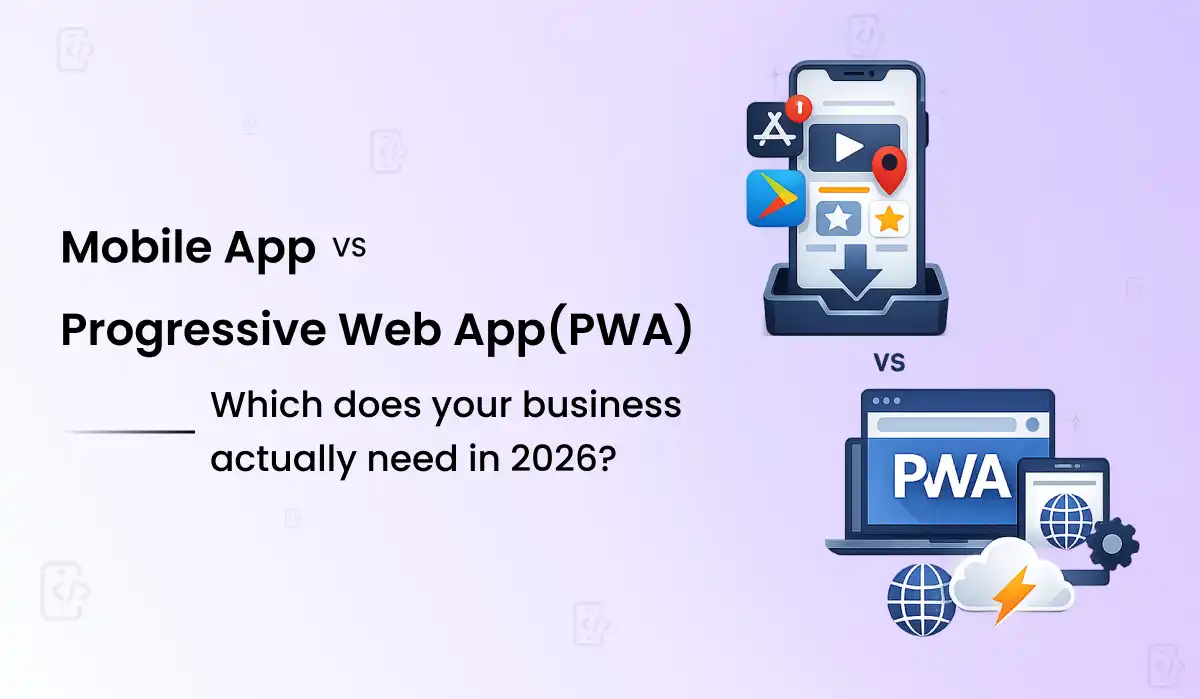
Most agencies will tell you to build a native app because that’s what they sell. We’re going to tell you the honest answer — and for a meaningful number of businesses reading this, that answer is a PWA, not a native app.
The honest answer, before anything else Build a PWA if you’re a content, e-commerce, or service business where people find you through search or a shared link, and getting them to value fast matters more than deep daily engagement. Build a native app if your product lives on daily habitual use, needs deep device hardware, or your business model depends on App Store discoverability. PWAs cost 60–80% less to build and 5–10% of that cost annually to maintain, versus 15–20% for native. Neither answer is the “better” technology — they solve different problems, and a meaningful number of businesses asking this question should choose the cheaper, faster option. See our mobile app development service →
There’s a reason this question keeps coming up in founder conversations, and it isn’t because Progressive Web Apps are new — the technology has existed for over a decade. It’s because the gap between what a PWA can do and what a native app can do has narrowed dramatically in the last two years, to the point where the old advice — “always build native if you can afford it” — is no longer reliably true.
We’re going to say something most development agencies won’t say directly: a meaningful number of the businesses asking us about a mobile app would be better served by a PWA. Not because it’s cheaper for us to build — we build both — but because their actual user behaviour doesn’t match what native apps are good at. This guide is the honest version of that conversation, the one we have with clients before they sign anything.
An app built specifically for iOS (Swift) or Android (Kotlin), or both at once using Flutter. Downloaded from the App Store or Google Play, installed on the device, and compiled to run directly on the phone’s hardware — which is why it can access the camera, Bluetooth, background location, and every other sensor with full performance.
A website built with standard web technology — HTML, CSS, JavaScript, typically React or Next.js — that behaves like an app. Users tap “Add to Home Screen” directly from their browser, no app store needed. It runs inside the browser engine, gets an icon, works offline through a Service Worker, and sends push notifications.
The word “progressive” in PWA is the part most explanations skip — it means the experience improves progressively based on what the device and browser can do. On a modern phone with a strong connection, it feels like a full app. On an older device or a weak connection, it degrades gracefully — still usable, still functional, just less flashy. That graceful degradation is precisely the opposite of how a native app fails: a native app either works or crashes, with no middle ground.
This is where the decision usually gets made in practice, regardless of what the feature comparison says. Cost isn’t just the build — it’s the three-year total, and the gap compounds every year you maintain two separate codebases instead of one.
| Cost Factor | Native App (iOS + Android) | PWA | Why |
|---|---|---|---|
| Initial build (mid-complexity) | $20,000–$60,000 | $8,000–$25,000 | Two codebases vs one |
| Codebases to maintain | 2 (Swift + Kotlin) | 1 (React/Next.js) | Native requires separate teams |
| Annual maintenance | 15–20% of build cost | 5–10% of build cost | Single update reaches all users instantly |
| App store fees | $99/yr (Apple) + 15–30% commission | $0 | PWAs bypass app stores entirely |
| Update deployment time | 1–7 days (review + rollout) | Instant | No app store review process |
| Time to market | 10–20 weeks typical | 6–12 weeks typical | Single platform, web deployment |
The three-year cost reality most quotes don’t show you: A $40,000 native app at 18% average annual maintenance costs roughly $21,600 over three years just to stay running — before a single new feature. A $15,000 PWA at 8% average annual maintenance costs about $3,600 over the same period. The gap isn’t just the build price; it compounds every year you’re paying for two platforms instead of one. This is the number that should be in every PWA-vs-native conversation, and most agencies leave it out because the build quote looks more competitive without it.
“The question isn’t which technology is better. It’s which one matches how your specific users actually find you, use you, and come back to you. Get that match wrong and the better-engineered product still loses.”
This is the part that’s changed the most in the last two years. A common question we hear: does PWA work on iOS in 2026? The answer is yes — iOS 16.4 added meaningful Service Worker and web push notification support to Safari, historically the single biggest reason PWAs felt second-class on iPhone. That gap is now mostly closed for everyday use cases, though a few real differences remain.
| Capability | Native App | PWA in 2026 | Gap? |
|---|---|---|---|
| Push notifications | Full support | Full support (iOS 16.4+) | Closed |
| Offline functionality | Full support | Strong (Service Worker caching) | Mostly closed |
| Home screen install | Via app store | “Add to Home Screen,” no store | PWA simpler |
| Camera access | Full native API | Good (getUserMedia API) | Minor gap |
| Bluetooth / NFC | Full support | Limited / inconsistent | Real gap remains |
| Background location | Full support | Very limited | Real gap remains |
| App Store discoverability | Yes — App Store/Play Store search | No — relies on web SEO instead | Different channel, not worse |
| SEO / search indexing | Not indexed by Google | Fully indexed, ranks in search | PWA wins outright |
| Install friction | App store download required | One tap, no download | PWA wins outright |
Built a PWA alongside their native app specifically for users who wouldn’t download a full app just to check menu items and order ahead occasionally.
Launched a PWA MVP first to test real market demand before committing engineering budget to native, validating the model cheaply.
Chose native specifically for security architecture and performance requirements that a browser-based PWA couldn’t meet for sensitive patient data.
Used a PWA for driver onboarding paperwork (occasional, low-engagement use) while building native specifically for live fleet GPS tracking.
The pattern across every real example: nobody picks one technology for the whole business: Every credible case study points the same direction — the right answer is rarely “PWA for everything” or “native for everything.” It’s “PWA for the parts of the business where speed and reach matter most, native for the parts where deep engagement or hardware access is non-negotiable.” If your business has both kinds of user journeys, building both eventually is normal — the question is just which one you build first, and that decision should follow your actual budget and your most urgent user need, not a blanket rule.
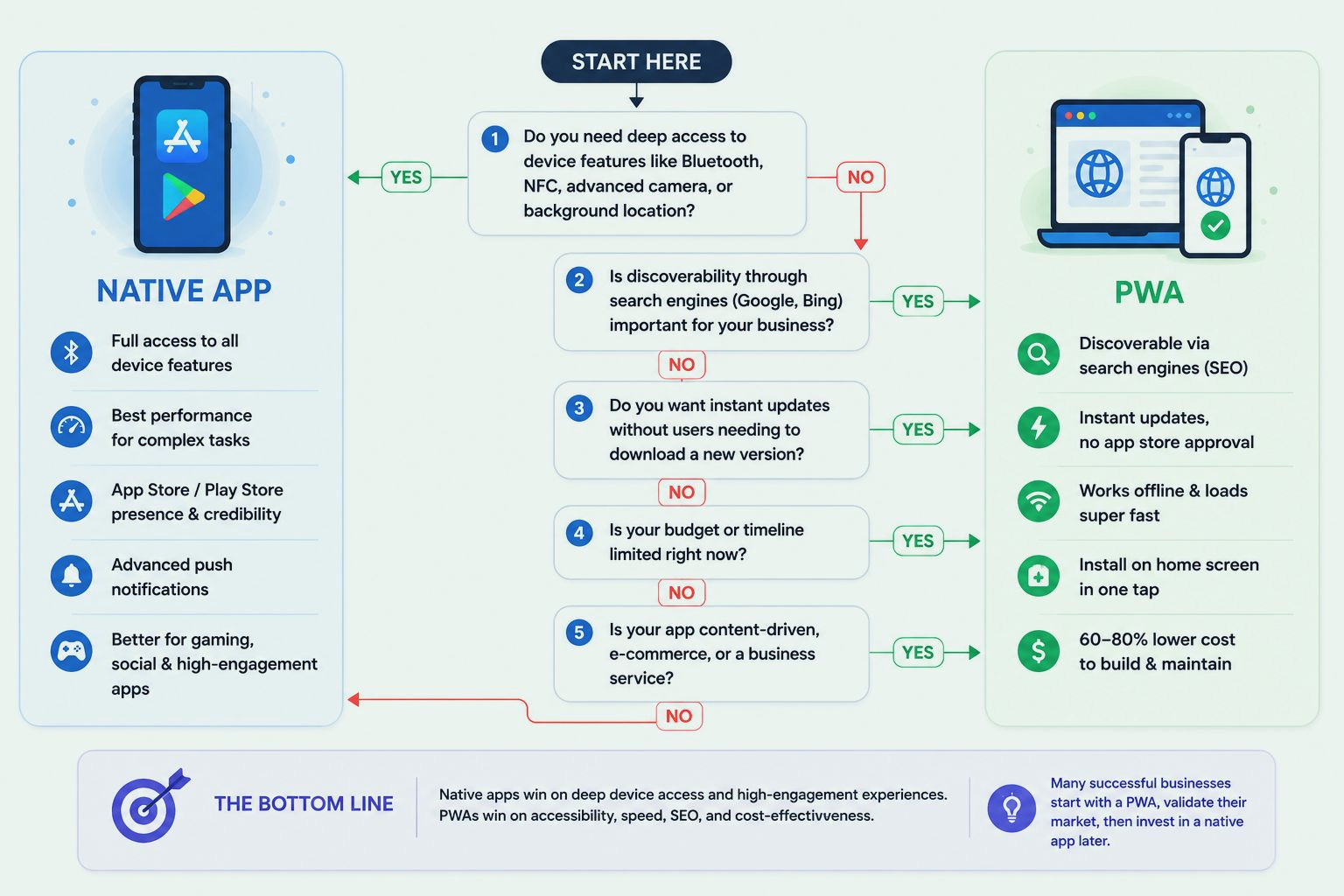
If it’s search, social shares, or word-of-mouth links — PWA wins on discoverability. If it’s app store browsing in your category — native has the edge.
Daily habitual use (social, fitness, messaging) favours native’s superior retention mechanics. Occasional use (booking, ordering, checking status) favours PWA’s lower-friction access.
Bluetooth peripherals, NFC payments, continuous background location — these still genuinely require native. Camera, basic location, and push notifications no longer do.
If you need to validate a business model in the next 2–3 months on a constrained budget, a PWA gets you there at 60–80% less cost — start there, add native once you’ve proven demand.
Native apps are invisible to Google search. A PWA is a real, indexable website that can rank — if organic search is meant to drive a meaningful share of your growth, that alone can settle the decision.
Flutter — the framework Primocys builds most apps with — complicates the Flutter vs PWA comparison in a useful way. A single Flutter codebase compiles to native iOS, native Android, and web simultaneously, which means the PWA-vs-native choice doesn’t always have to be either/or at the codebase level. For businesses that want native app store presence eventually but need to move fast and cheap now, building in Flutter from day one and shipping the web version first as a PWA-like experience, then submitting the same codebase to app stores later, is a genuinely practical middle path many founders don’t know exists.
This isn’t the right fit for every PWA use case — a pure web-technology PWA (React/Next.js) will always have lighter weight and tighter SEO integration than a Flutter web build. But if your roadmap clearly includes “native eventually,” starting in Flutter avoids a costly rebuild later. See our mobile app development service →
Primocys builds native apps (Flutter, Swift, Kotlin) and PWAs (React, Next.js, Vue) under one roof. We don’t have a financial incentive to push you toward the more expensive option — we’ll walk through your actual user behaviour and recommend the path that fits, even when that means a smaller invoice.
We assess your actual use case before recommending a technology — not the other way around.
One codebase, native iOS, Android, and web. Clutch Top Flutter Developer 2024 & 2026.
Service worker caching, push notifications, sub-2-second load times, full Core Web Vitals compliance.
Validate demand cheaply first. We architect the upgrade path from day one if that’s your plan.
Cost agreed before development starts. No surprise invoices regardless of which technology you choose.
Native and web, across social, fintech, healthcare, and e-commerce. Clutch 4.9★ verified.
The mobile app vs progressive web app debate doesn’t have a universal winner in 2026 — it has a right answer for each specific business, and that answer depends on how your users find you, how often they come back, and whether your product genuinely needs hardware the browser can’t reach.
For most content, e-commerce, and service businesses, a PWA is the smarter starting point. It costs 60–80% less to build, deploys instantly, ranks in Google search, and works on every device without an app store download. The gap between PWA and native app performance has narrowed dramatically since iOS 16.4 — for everyday business use cases, most users won’t notice the difference.
Build a native app when daily habitual engagement is your entire business model, when you need Bluetooth, NFC, or continuous background GPS, or when App Store discoverability is a core acquisition channel. If you’re not sure, start with a PWA to validate demand — then add native once you have a user base worth the investment. Flutter gives you a third path: one codebase that covers both.
If you’re still unsure which one fits your specific situation, talk to our team — we build both, and we’ll give you an honest recommendation before any contract is signed.

Hear from our clients and why 1200+ businesses trust Primocys

"Our B2B and B2C platform helps Nigerian manufacturers sell at wholesale prices and suppliers offer competitive retail pricing, with a strong focus on Made in Africa products and easy local and international distribution. The app has received excellent user reviews for its design and unique features. Communication with the Primocys team was smooth in an agile setup, even beyond office hours when needed. Their mobile app development expertise is excellent—highly professional and reliable."

"The dating app was delivered successfully and approved by both Apple App Store and Google Play. Our users are highly impressed with the design, UI, and overall functionality. The project was well planned with clear milestones, and all modules were delivered on time. The team is talented, patient, and flexible, accommodating multiple scope revisions as requirements evolved. Their 24/7 development and support availability made the entire process smooth and reliable."

" We hired Primocys to develop a highly complex and specialized mobile application, and they delivered outstanding results. The app includes advanced features such as timeline mixers, classifieds, payments, advertisements, GPS functionality, and more. Their technical skills, timely delivery, availability, and the personal attention Arpan Sagar brings to each project truly stand out. The team stays focused and committed from start to finish—an excellent experience overall."

" Great team with excellent communication and a strong commitment to on-time delivery. They developed a fully customized mobile app for both Android and iOS, perfectly matching our requirements. The entire process was smooth and professional, with clear updates at every stage. They are reliable, skilled, and very easy to work with. We’re continuing our partnership on more projects, and choosing them has been one of the best business decisions I’ve made."

AWARDS




TRUSTED BY GLOBAL BRANDS