


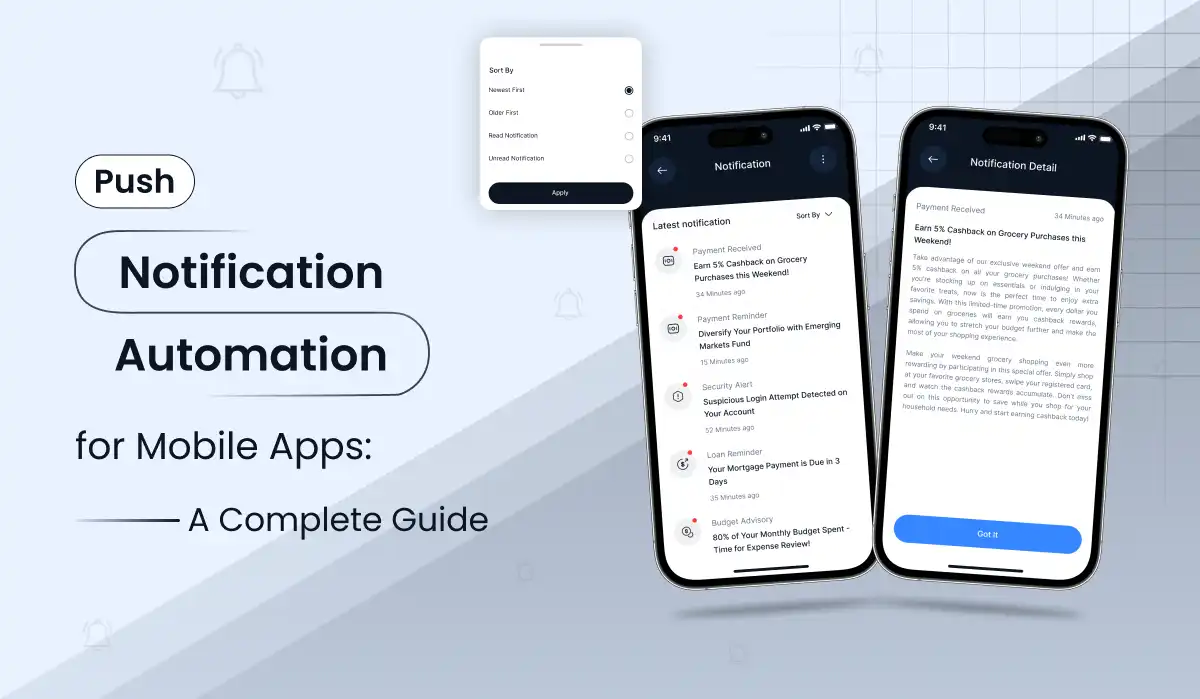
Your app is installed. A week later, the user has forgotten about it. Should you send a reminder every day, wait for something meaningful to happen, or offer a reason to come back? A good push notification automation engine answers that question for every user—without a marketer manually pressing “send.”
Quick answer: Push notification automation is a system that sends relevant app messages based on lifecycle stage, behavior, preferences, and subscription status. A backend decides who and when; a messaging service such as Firebase Cloud Messaging (FCM) delivers the notification. AI is optional: it can help draft message variants, but it should not replace business rules, consent, or entitlement checks.
What Is Push Notification Automation for Mobile Apps?
Manual push messaging is simple: someone writes a notification, chooses an audience, and schedules it. Automated push notifications work differently. An app event—such as a completed purchase, an unfinished onboarding flow, or three days without activity—enters a decision system. That system checks whether the message is appropriate, whether the user has consented, and whether another message was recently sent. Only then does it send the notification.
This is more than “schedule five messages every day.” A user who just upgraded should stop seeing “Unlock Premium” promotions. A parent who has already finished setting up a child profile should not receive another profile setup reminder. A user who turned off promotional alerts should not get them. Those are the small, essential decisions that distinguish a lifecycle automation engine from a message calendar. They are easiest to get right when automation is planned during the mobile app development process, not bolted on after launch.
| Approach | How messages are chosen | Best use |
|---|---|---|
| Manual campaigns | A team writes and sends each campaign | Occasional announcements |
| Rule-based automation | Events, segments and schedules determine eligibility | Onboarding, renewal, reminders, retention |
| AI-assisted automation | Rules choose the audience; AI proposes suitable copy | Content variation at scale, with approval and safeguards |
Lifecycle Push Notifications: Design the Journey First
Think about two people who downloaded the same app. One opened it once and never returned. Another uses it every evening and has an active subscription. Sending both the same “Try Premium” notification isn’t personalization; it’s a missed opportunity.
The strongest starting point is a small set of mutually exclusive lifecycle segments. Each segment should have a clear business objective, entry condition, exit condition and sending limit.
| User stage | Example automation | When to stop |
|---|---|---|
| New install / first open | A welcome message, then one nudge to finish setup, sent only if onboarding is still incomplete after 24 hours | Onboarding is completed or the user opts out |
| Free, early lifecycle | Feature-discovery pushes over the first 7–14 days, each pointing to an action the user hasn’t tried yet | The user subscribes, opts out or the 14-day journey ends |
| Free, established | Low-frequency weekly prompts based on past activity, such as a fresh story idea or an unused feature | The user subscribes or opts out, or goes inactive and the prompts pause |
| New subscriber | Confirm the unlocked benefits and guide the first premium action, only after the store verifies the purchase | The first premium action is completed or the intro sequence ends |
| Active subscriber | Relevant content, unfinished activities and opted-in routines, all within a shared frequency cap | Preferences change or the account becomes inactive |
| Expired subscription | An accurate access update, then an occasional renewal offer once the expiry is store-confirmed | Access is restored or the user opts out |
These stages are a framework, not mandatory frequencies. A banking app, fitness app and children’s story app will need different cadences. Test sending frequency against user retention and notification opt-outs, rather than assuming more alerts always mean more conversions.
What happens after Day 14?
A common mistake is building a 14-day sequence and stopping entirely. The better design treats onboarding as one temporary state within a continuing lifecycle. On Day 15, eligible free users can move into a lower-frequency campaign. Subscribers follow a different retention journey. Users who ignore repeated messages should receive fewer—not more—prompts. This is also where push notification re-engagement works best: relevant, capped and easy to opt out of.
Behavioral Push Notifications: Events Worth Automating
Scheduled messages are useful, but user actions often give a clearer reason to reach out. Start with a short list of trustworthy events, give each one a clear eligibility rule, and make sure every notification leads to one obvious next step.
| Event | Eligibility rule | Example push |
|---|---|---|
| Account setup abandoned | Still incomplete after 24 hours; send once, then stop | “Your next adventure is waiting. Finish setting up when you’re ready.” |
| First useful action completed | Action completed, with no similar message sent recently | “Enjoyed your first story? Create another together.” |
| Paid feature viewed | Free user with genuine interest and no recent paywall reminder | “Liked what you saw? See what a subscription unlocks.” |
| Three days inactive | Previously engaged, still opted in and within the frequency cap | “There’s something new to explore whenever you’re ready.” |
| Subscription activated | Store-verified active entitlement | “Your new features are ready—take a look.” |
| Subscription expired | Store-confirmed loss of access | “Your plan has ended. Review your options.” |
Event-based doesn’t mean immediate by default. A user who just closed a paywall may be annoyed by a notification arriving seconds later. Often the better choice is to wait until a reasonable local hour, and to cancel the reminder if the user returns or subscribes first.
Push Permission: How to Raise Opt-In Rates
Mobile app push notifications only reach users who opt in. Ask for permission after the app has shown value, not on first launch, and explain the benefit on a short pre-permission screen before the system prompt appears.
On iOS, the system prompt appears once, so a declined request must be changed in device settings. Android 13 and later also asks for notification permission at runtime. Offer a clear in-app path to settings and let users choose which notification types they want. Opt-in rates vary widely by app, audience and prompt timing, so measure your own baseline instead of copying a benchmark.
How to Build a Firebase Push Notification Automation Engine
For Flutter, native iOS, or native Android apps, a practical architecture combines a mobile SDK, a trusted Node.js backend , subscription events, a scheduling queue and FCM. Firebase handles messaging transport; your product backend handles your business rules. FCM by itself is not a complete custom subscription-lifecycle engine.
Track a small set of reliable events
Start with a short, dependable event list: first_open, onboarding_completed, story_created, subscription_page_viewed, subscription_activated, subscription_expired and notification_opened. Keep event names identical across mobile clients and the backend, and avoid recording children’s story content or other unnecessary personal data just to send marketing messages.
Keep subscription entitlements server-verified
App Store and Google Play subscription status can change outside the app. Let store notifications, validated transactions (a RevenueCat-based Flutter subscription setup is a common way to handle this) and your own entitlement database drive audience changes, never a boolean cached on the phone. On purchase, cancel pending free-user promotions. On expiration, verify access has actually ended before mentioning a renewal.
Make scheduled messages cancellable
A job created yesterday may no longer be appropriate today. Before each send, re-check the current subscription, notification preferences, quiet hours, frequency caps and recent sends. Use an idempotency key so retries never create duplicate notifications, and handle invalid or rotated device tokens and queue failures gracefully.
Open the right screen
Every push needs a useful destination: “Create a new story” should open story creation, and “Manage subscription” should open subscription settings. A generic home-page deep link wastes the moment the message earned. Reliable push notification deep linking turns a tap into a finished task.
Respect platform-specific permission and delivery behavior
Request push permission at a contextually sensible moment and honor the user’s choice. Apple and Android have different permission flows and delivery constraints, and a request accepted by FCM does not guarantee that a person saw or opened the push. For critical messages, use account communication channels such as email or in-app notices rather than relying only on notifications.
Do You Need AI to Automate Push Notifications?
No. The system can run reliably using a library of approved messages and deterministic rules. AI is useful for a narrower job: drafting fresh wording, creating language variations, and suggesting alternatives for controlled experiments.
A sensible hybrid workflow is to have AI prepare 20–30 new copy variants periodically, let a human reviewer approve them, and store them in a versioned template library. The backend then picks a suitable template based on the user’s real state. That is usually cheaper, easier to audit and safer than generating a new AI response for every single send.
AI guardrail: Do not let a language model invent discounts, fabricate an expiring offer, claim a child has achieved a learning milestone, or assume a subscription benefit the user does not own. The backend should provide a list of permitted, verified facts, and your team should approve promotional copy.
Practical Product Example: EmoTales and Parent-Focused Storytelling
Consider EmoTales , an AI storytelling app in which children choose emojis and generate personalized stories. It provides an easy-to-understand example of how lifecycle messaging should change between a free account and an active subscriber. This is an illustrative notification architecture, not a claim that every campaign shown below has already been deployed or achieved measured results.
The Challenge
A parent downloads the app because bedtime stories sound fun. They create an account but may forget to return after a busy day. A blanket “Subscribe now” message doesn’t explain what makes the product useful, and it makes little sense to send the same promotion to a family that has already paid.
The Proposed Solution
First, introduce the real benefit: creative screen time, imaginative stories and family bedtime moments. Then distinguish users based on actions and verified entitlement state. Free users can receive occasional messages about available features and plan benefits. Subscribers get practical ideas for using the features they already paid for. The rule engine reduces frequency when the parent is inactive and respects notification preferences.
| Moment | Audience | Sample notification |
|---|---|---|
| First day, after signup | New parent who has just created an account | “Your child’s next story starts with an emoji 🌈” |
| Next bedtime, in the parent’s local time | Free, engaged parent who is still opted in | “Tonight, let your little one choose the adventure 🌙” |
| After a relevant paid-feature visit | Free parent with no recent upgrade reminder | “Discover longer stories and more emoji choices ✨” |
| After a verified purchase | New subscriber with store-confirmed access | “Your subscription features are ready 🎉” |
| Following week | Active subscriber within the frequency cap | “A new family story night is waiting 📖” |
Impact to Measure—Not Assume
The business case should be judged by controlled metrics: parent opt-in rate, story creation after a notification, seven- and thirty-day retention, free-to-paid conversion, subscription renewal, and opt-outs. Compare a carefully targeted notification group with a lower-frequency or holdout group. Do not present hypothetical conversion improvements as real client results.
For a second example, see Primocys’s Burpout fitness app case study , which discusses app activity and push-notification workflows in a different product category.
Build vs Buy: Custom Engine or Push Platform?
A managed push platform is often enough for simple campaigns. A custom Firebase engine pays off when eligibility depends on your own data, such as verified subscription status. Choose based on how much your messaging rules depend on that data, not on which option looks quickest to launch. It’s the same trade-off we cover in our build vs buy software guide.
| Option | Best when | Watch out for |
|---|---|---|
| Managed push platform | You need quick campaigns, basic segments and a dashboard, and your rules don’t depend on your own data | Limited custom rules, and recurring plan fees that grow with your user base |
| Firebase + custom backend | Messages depend on subscriptions, behavior or business rules that only your backend knows | Needs engineering for rules, queues and maintenance, so plan for ongoing ownership |
| Hybrid | A platform handles sending and dashboards, while your backend decides who is eligible | Two systems to keep in sync, so define one source of truth for user state |
Push Notification Automation Cost and Timeline
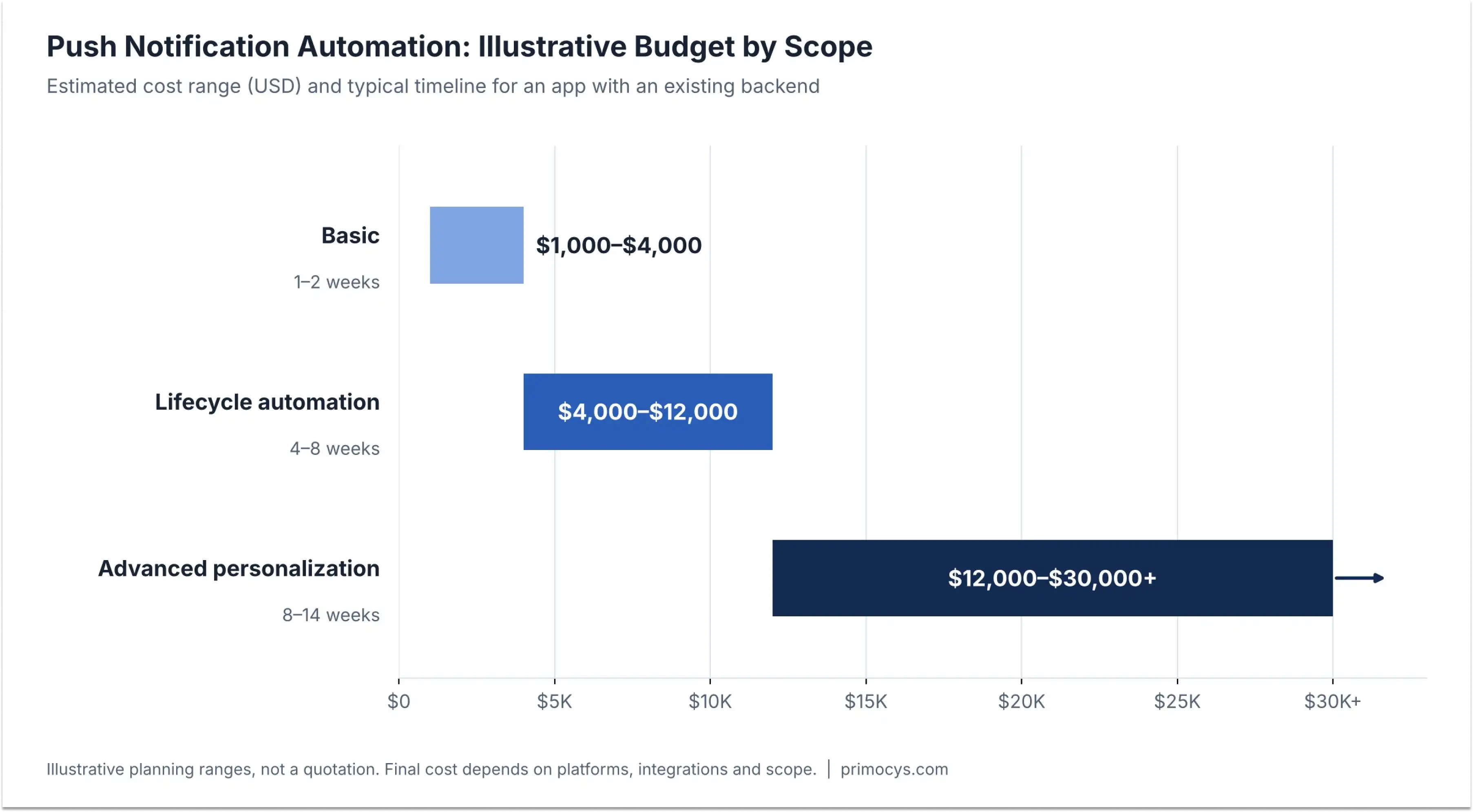
Teams often ask for the price of “Firebase notifications” when they actually need several separate features. Basic push delivery may be straightforward; the complexity comes from eligibility rules, subscription events, a scheduler, administration, analytics and reliability. That is why two apps that both “send push notifications” can differ several times over in cost.
| Scope level | Typical capabilities | Main engineering effort | Illustrative budget (USD) | Typical timeline |
|---|---|---|---|---|
| Basic | Token registration, manual push sends and simple segments | Mobile SDK setup and basic backend delivery | $1,000–$4,000 | 1–2 weeks |
| Lifecycle automation | First-open journeys, event triggers, scheduled jobs, opt-outs and deep links | Rules engine, event tracking, queue and testing | $4,000–$12,000 | 4–8 weeks |
| Advanced personalization | Entitlement-aware campaigns, admin editor, experiments, localization and AI-assisted copy | Campaign management, data quality, analytics and guardrails | $12,000–$30,000+ | 8–14 weeks |
Illustrative planning ranges for an app with an existing backend, not a quotation. Platforms, integrations and scope change the final budget and timeline.
Actual implementation cost depends on the existing app architecture, number of platforms, availability of subscription webhooks, admin tooling, message volume and testing needs. Firebase messaging transport and AI text generation may have different pricing models; infrastructure and engineering are not interchangeable. For a quick ballpark first, try our app cost calculator. For a practical estimate, ask a mobile app development team to review the existing backend rather than quoting from the number of notifications alone.
How to Know Whether Automated Push Notifications Are Working
Open rates are useful, but they aren’t the whole story. A notification that gets tapped yet causes users to disable alerts is not a clear win. Track the actions that matter after the app opens, and judge each push by what users do next, not by the tap alone.
Activation
Users completing their first meaningful action after install or a notification tap.
Retention
Return usage on Day 7 and Day 30, compared with a group that received no automated pushes.
Conversion
Eligible free users becoming paid, tracked through to renewal rather than the first purchase alone.
Monitor opt-in rate, delivery feedback where available, tap/open rate, post-open task completion, churn, unsubscribe rate and the share of users who mute notifications. Segment every number by lifecycle stage, because a new user and a long-term subscriber should not be expected to behave alike.
Push notification best practices: common mistakes
Most push notification problems come from a few repeatable mistakes. Check your plan against this list before the first campaign goes live.
- Sending an upgrade promotion after the user has subscribed.
- Using one fixed worldwide sending time instead of each parent’s local time.
- Letting scheduled and event-based messages exceed a shared frequency cap.
- Reusing the same title every week until users tune it out.
- Failing to cancel queued jobs when an account or entitlement changes.
- Publishing AI-generated claims without verifying the app’s real features.
- Collecting more personal information than necessary, particularly for children’s apps.
Pre-launch checklist
Run through these eight checks before launch, so every automated message is accurate, consented and measurable from day one.
- Define each audience’s entry and exit conditions.
- Create a parent-friendly notification permission and preference flow.
- Verify iOS, Android and store-subscription event handling.
- Confirm every deep link opens the intended app screen.
- Implement per-user caps, quiet hours and duplicate prevention.
- Test campaigns across free, newly paid, active and expired accounts.
- Set a non-notified comparison group and track meaningful outcomes.
- Review notification copy for accuracy and privacy before launch.
Conclusion: Automate Push Notifications With Confidence
Good push notification automation is not about sending more messages. It is about sending the right message to the right user at the right moment, with consent, frequency caps and verified data behind every decision. Start with a few lifecycle journeys, ask for permission at the right time, choose the build route that fits your rules, and measure outcomes such as retention and conversion, not just opens.
To plan this for your own app, a short review of your events, backend and subscription setup is the fastest way to a realistic scope.
Push Notification Automation FAQs
How to automate push notifications after an app install?
first_open and onboarding_completed, then let your backend check eligibility, consent and frequency caps before scheduling each message. Once the device grants permission, lifecycle pushes run automatically, and the backend re-checks the user’s state just before every send.Does Firebase automatically know who is a paid subscriber?
Is AI required for a push notification automation engine?
Do Flutter push notifications work on iOS and Android?
How much does push notification automation cost, and how long does it take?
Should I build a custom engine or buy a push platform?
How do I improve push notification opt-in rates?
Related Guides

Build your scalable apps today.
Contact UsLeaving Already?
Hear from our clients and why 1200+ businesses trust Primocys

"Our B2B and B2C platform helps Nigerian manufacturers sell at wholesale prices and suppliers offer competitive retail pricing, with a strong focus on Made in Africa products and easy local and international distribution. The app has received excellent user reviews for its design and unique features. Communication with the Primocys team was smooth in an agile setup, even beyond office hours when needed. Their mobile app development expertise is excellent—highly professional and reliable."

"The dating app was delivered successfully and approved by both Apple App Store and Google Play. Our users are highly impressed with the design, UI, and overall functionality. The project was well planned with clear milestones, and all modules were delivered on time. The team is talented, patient, and flexible, accommodating multiple scope revisions as requirements evolved. Their 24/7 development and support availability made the entire process smooth and reliable."

" We hired Primocys to develop a highly complex and specialized mobile application, and they delivered outstanding results. The app includes advanced features such as timeline mixers, classifieds, payments, advertisements, GPS functionality, and more. Their technical skills, timely delivery, availability, and the personal attention Arpan Sagar brings to each project truly stand out. The team stays focused and committed from start to finish—an excellent experience overall."

" Great team with excellent communication and a strong commitment to on-time delivery. They developed a fully customized mobile app for both Android and iOS, perfectly matching our requirements. The entire process was smooth and professional, with clear updates at every stage. They are reliable, skilled, and very easy to work with. We’re continuing our partnership on more projects, and choosing them has been one of the best business decisions I’ve made."
AWARDS

Share Your Requirements
TRUSTED BY GLOBAL BRANDS